
GOOGLE BUSINESS PROFILE
Google Business Profile for Home Builders: Setup and Optimization Guide
For many buyers, your Google Business Profile is the first thing they see. Here is how to set it up correctly, optimize it, and keep it working month after month.
ESTIMATED READ TIME: 14 MINUTES
Want to skip the reading? Speak directly with our Director of Growth Strategy.
When a family searches for a custom home builder in their area, the first thing they often see isn’t a website. It’s a map with a handful of builder listings, each showing photos, star ratings, and a phone number.
Those listings come from Google Business Profile. For many buyers, your profile is their first impression of your company. It may be the reason they call you, or the reason they scroll past.
Yet many builders set up their profile once, years ago, and haven’t touched it since. Others have made setup mistakes that quietly limit where they appear.
This guide walks you through how to set up a Google Business Profile the right way as a custom home builder, and how to optimize and maintain it so it keeps working for you.
The short answer: To set up a Google Business Profile as a home builder, claim and verify your business, set it up as a service-area business with your address hidden (unless clients visit your office), choose “Custom home builder” or the closest specific primary category, and add your service areas, services, description, and real project photos. Then keep it active with steady reviews, replies, photos, and updates.
Why Google Business Profile Matters So Much for Builders
Your Business Profile controls how your business appears in Google Maps and in the local map results on Google Search. It shows:
- Your business name, category, and contact details
- Your star rating and reviews
- Photos of your work
- Your services and service areas
- Links to your website and a button to call you
Google has explained that local results are mainly based on relevance, distance, and prominence. Your profile directly affects the first and third of these. Complete and accurate information helps Google match you to more searches. Reviews and your overall reputation help with prominence.
For a custom builder, the profile also plays a trust role. A buyer about to spend millions wants to see a real business with real projects and real clients. A thin profile with three old photos and no recent reviews raises questions before you’ve said a word.
The profile is only one part of being found locally. For the bigger picture, see our guide to how clients research builders before they call.
Before You Start: Gather These Details
Setup goes faster if you have everything ready. Prepare:
- Your exact business name, as it appears on your signage, contracts, and website
- Your office address, if you have a staffed office
- The list of towns or postal codes you want to serve, in order of priority
- Your main business phone number (a local number is best)
- Your website address, ideally pointing to your homepage or a strong service page
- A short description of what you build and where
- Your logo and 10 to 20 strong project photos to start
- Your business hours, including whether you meet clients by appointment
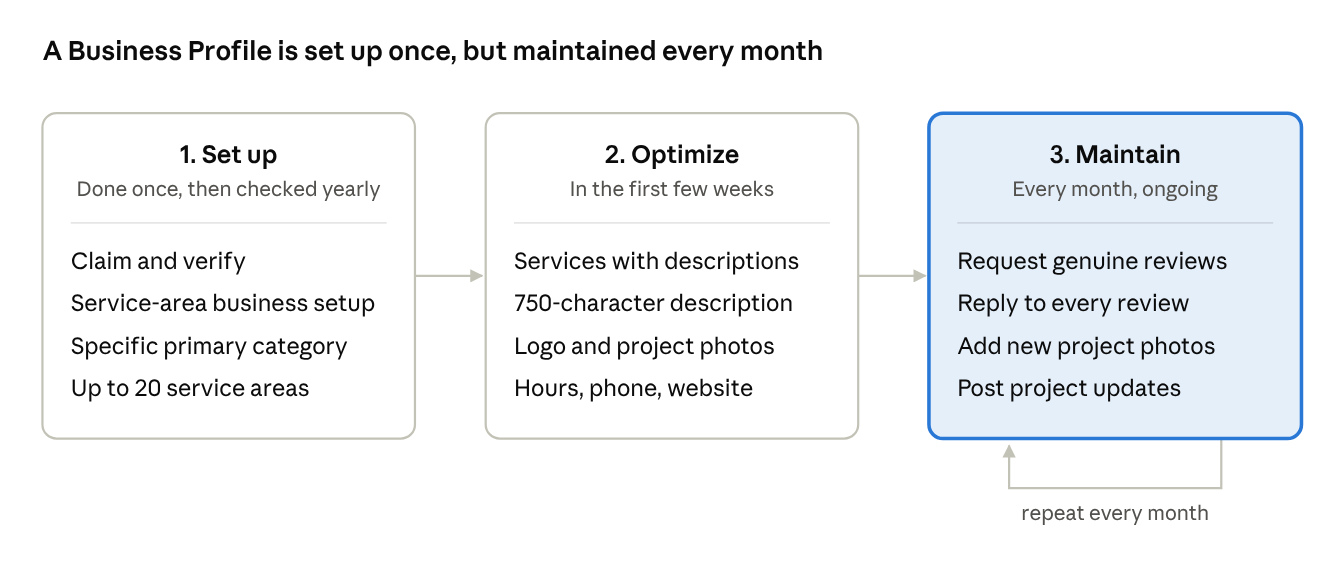
Most of the long-term value comes from the third stage. Setup gets you listed; monthly upkeep keeps you competitive.
How to Set Up Your Google Business Profile: Step by Step
1. Search for your business first
Before creating anything, search your business name on Google Maps. A profile may already exist, created by a past employee, an old agency, or Google itself. If one exists, claim it rather than creating a new one. Google’s guidelines allow only one profile per business location, and duplicates can cause confusion or suspension.
2. Create or claim your profile
Go to Google Business Profile and sign in with a Google account your company controls. Use a business account, not a personal one tied to an employee who might leave. If an agency or staff member manages the profile, add them as managers rather than handing over ownership.
3. Enter your real business name
Use your business name exactly as it appears in the real world: on your signs, website, and contracts. Google’s guidelines for representing your business don’t allow extra marketing words, service descriptions, or locations in the name.
So “Summit Ridge Homes” is fine. “Summit Ridge Homes – Luxury Custom Home Builder Denver” is not. It can be tempting, but keyword-stuffed names put your profile at risk of suspension.
4. Decide whether to show your address
This is the most important setup decision for builders, and the one most often done wrong.
- If clients visit your staffed office or design studio during business hours, you can show your address and also add a service area. Google calls this a hybrid business.
- If clients don’t visit your office, or you work from home, set up a service-area business and hide your address. Google’s guidelines say service-area businesses that don’t serve customers at their address should not show it.
Whatever you choose, you need a real, staffed location. Google doesn’t allow virtual offices, rented mailboxes, or P.O. boxes as a business address. Never use a model home or job site as your business address unless it is genuinely staffed as your office during posted hours.
5. Choose your primary category
Your primary category tells Google what your business is. Google’s category guidance says to choose the most specific category that fits and notes that categories affect your local ranking.
For most custom builders, “Custom home builder” is the best primary category. If that doesn’t fit, “Home builder” is the next option.
Additional categories should describe real parts of your business, not every service you offer. Good examples, if they genuinely apply:
- General contractor, if you also take on major renovations or additions
- Construction company, if it reflects how you operate
Avoid adding categories for work you subcontract, such as roofing or cabinetry. Google advises using only a few, and changing categories can trigger re-verification.
6. Add your service areas
Google lets you add up to 20 service areas by city, postal code, or region. It also says your overall service area generally shouldn’t extend more than about two hours’ drive from your base.
Tips for builders:
- Start with the towns where you most want to build, not every town you’d accept a job in.
- Use towns and neighborhoods your buyers actually search for. Wealthy enclaves and mountain towns often have their own names that buyers use.
- Be honest. Listing distant towns you rarely work in won’t help you rank there. Your service areas tell buyers where you work, but distance from your base still matters for map rankings.
7. Add your phone number and website
Use a local phone number that’s answered during business hours. For the website field, link to your homepage or your main custom home building page. If you use call tracking, set it up carefully so the number shown is consistent with your website and other listings.
8. Verify your business
Google needs to confirm you’re a real business before your profile goes live in full. According to Google’s verification guide, methods can include phone or text, email, a live video call, a video recording, or a postcard, depending on your business type and location. Google decides which options you get, and it may ask for more than one.
Video verification is common for service-area businesses. Be ready to show your business signage or branded vehicle, your office or tools of the trade, and proof that you manage the business, such as business documents. Google says reviews of your information can take up to five business days, and sometimes longer.
How to Optimize Your Profile So Buyers Choose You
Once your profile is verified, the goal shifts from “listed” to “chosen.” Here’s how to make your profile both more visible and more convincing.
Write a clear business description
Google allows up to 750 characters for your business description, with no links or promotional offers. Use it to say plainly:
- What you build (custom homes, luxury homes, modern mountain homes, and so on)
- Where you build (your main towns or region)
- What makes your process different (design-build, fixed-price contracts, energy-efficient building, and so on)
- Who you work best with (families building on their own land, clients working with architects, and so on)
Example: “Summit Ridge Homes designs and builds custom homes on mountain and hillside lots across Boulder and Jefferson Counties. Our design-build team guides families from lot review and design through construction and move-in, with fixed-price contracts and weekly progress updates. We build energy-efficient homes from 3,500 to 8,000 square feet and work closely with clients’ architects and interior designers.”
Write for a person first. Mention your town names naturally, but don’t turn the description into a list of keywords.
Add your services
In the services section, list each service you actually offer, such as custom home building, design-build, lot evaluation, and major renovations. Google lets you add custom services and descriptions. Use the descriptions to explain each service in a sentence or two. Leave out prices and phone numbers, which can cause services to be rejected.
Upload real photos of your work
Photos are one of the main things buyers look at on a builder’s profile. Google lists adding photos as one of its tips for improving local presence, and its photo guidelines say images should be in focus, well lit, and represent reality, without heavy filters. Photos should be JPG or PNG files between 10 KB and 5 MB.
A strong photo mix for a builder includes:
- Your logo and a cover photo that shows your best finished home
- Exteriors and interiors of completed projects
- Work in progress, such as framing, timber work, or site prep, which shows quality behind the walls
- Your team on site and in client meetings
- Details buyers care about, such as stonework, millwork, kitchens, and outdoor living spaces
Avoid stock photos. They don’t show your work, and buyers can usually tell.
Set accurate hours
If you meet clients by appointment, say so in your hours and description. Keep holiday hours updated so buyers don’t call a closed office and give up.
Keep everything consistent
Your business name, phone number, and website should match your website and other listings exactly. Inconsistent details confuse buyers and give Google mixed signals.
Want your profile set up and kept up for you?
Talk to us. We will audit your Google Business Profile and build a monthly routine for photos, posts and reviews.
How to Keep Your Profile Working Month After Month
A profile that was perfect two years ago but hasn’t changed since will slowly lose ground to builders who keep theirs active. Here’s a simple monthly routine.
Ask for reviews at the right moments
Google says more reviews and positive ratings can help your local ranking. For builders, reviews also carry huge weight with buyers making a major decision.
Build review requests into your client journey:
- At key milestones, such as move-in day or after a successful final walkthrough
- After the first season in the home, when clients have lived in it and can speak to quality
Google lets you create a review link or QR code to share. Send it by text or email with a short personal note. People rarely search for a review form on their own. We share timing and message ideas in how custom home builders get more Google reviews.
Stay within Google’s rules. Google’s review policy doesn’t allow incentives for reviews, such as discounts or gifts. It also doesn’t allow asking only happy clients for reviews or discouraging negative ones, and it doesn’t allow reviews from employees or people with a conflict of interest. That includes architects, designers, and trade partners you work with. Collect their testimonials for your website instead of asking them for Google reviews.
Reply to every review
Google’s tips for getting more reviews recommend replying to both positive and negative reviews, keeping replies short and personal, and addressing the reviewer by name.
For positive reviews, thank the client and mention a detail of their project. For example: “Thank you, Sarah and Mark. Building your home on that steep lot in Morrison was a challenge we loved solving.”
For negative reviews, stay calm. Don’t share private details or argue. Acknowledge the concern, explain briefly what you’ve done or will do, and invite the person to talk offline. Future buyers will judge you more by your reply than by the complaint itself.
If a review breaks Google’s policies, such as a fake review from someone who was never a client, you can flag it for Google to review.
Add new project photos every month
Every project milestone is a photo opportunity: foundations, framing, the roof going on, finished interiors. Fresh photos show buyers that you’re busy and that your recent work is as good as your older projects.
Post project updates
Google Business Profile lets you publish posts: short updates with photos and a button linking to your website. Google archives posts after six months unless you set a date range.
Ideas that work well for builders:
- A newly completed home, with a link to its project page
- A milestone on a current build
- An upcoming home tour or open house
- A short explainer, such as “What to know before buying a lot for a custom home”
Posts won’t make or break your rankings, but they keep your profile fresh and give buyers more reasons to click through to your site.
Watch your performance numbers
Your profile’s performance report shows how people found you and what they did, such as calls, website clicks, and direction requests. Check it monthly. If calls drop or website clicks fall, it’s often a sign that something changed, like a lost review streak or outdated photos.
For a fuller picture, connect your profile activity to actual leads. Our reporting and analytics service does exactly this for builders, so you can see which channels produce qualified projects.
Common Google Business Profile Mistakes Builders Make
- Adding keywords to the business name. It breaks Google’s guidelines and risks suspension.
- Showing a home address. If clients don’t visit, hide it and set a service area instead.
- Using a virtual office or mailbox to appear in a town where you don’t have a staffed office.
- Creating more than one profile for the same business.
- Choosing broad or unrelated categories, such as trades you subcontract.
- Listing service areas too far from your base. It rarely helps and can look misleading.
- Uploading stock photos instead of your own projects.
- Letting an old employee or past agency own the profile. Keep ownership in a company account.
- Ignoring reviews, especially negative ones.
- Setting it and forgetting it. An inactive profile slowly falls behind.
Final Thoughts: Make Your Profile Your Best First Impression
For many buyers, your Google Business Profile is the first look they get at your company. A complete, accurate, active profile tells them you’re established, busy, and trusted by real clients. An empty or outdated one sends the opposite message.
Get the setup right once: the correct name, address settings, category, and service areas. Then commit to a light monthly routine of reviews, replies, photos, and updates. It’s a small amount of work for one of the most valuable spots in local search.
If you’d rather have it handled for you, our team manages Business Profiles as part of our SEO service for custom home builders and our reputation management service. Book a strategy call and we’ll show you exactly where your profile stands today.
Make Your Profile Your Best First Impression
We work only with custom home builders. Book a call and we will help your Google Business Profile win the buyers who find you first on Google.
Frequently Asked Questions About Google Business Profile for Home Builders
Q1. Do custom home builders need a Google Business Profile?
Yes. Your Google Business Profile controls how you appear in Google Maps and the local map results on Google Search, which are often the first results buyers see when they search for a builder in their area. It’s free and is one of the most important local SEO tools available.
Q2. Should a home builder show their address on Google?
Only if clients visit a staffed office or design studio during business hours. If you work from home or meet clients on site, Google’s guidelines say to hide your address and set your service areas instead.
Q3. What is the best Google Business Profile category for a home builder?
For most custom builders, “Custom home builder” is the best primary category, because Google recommends choosing the most specific category that describes your business. Add only a few additional categories that reflect real parts of your business, such as “General contractor” if you also do major renovations.
Q4. How many service areas can a home builder add?
Google allows up to 20 service areas, set by city, postal code, or region. Google also says your overall area generally shouldn’t extend beyond about two hours of driving time from your business location.
Q5. Can I create a Business Profile for each town I build in?
Not without a real, staffed office in each town. Google allows one profile per business location and doesn’t accept virtual offices or mailboxes. To reach other towns, add them as service areas and support them with project pages and reviews.
Q6. How do I get more Google reviews as a builder?
Ask at the right moments, such as move-in day, and send clients a direct review link or QR code. Make it personal and easy. Don’t offer incentives or ask only happy clients, as both go against Google’s review policies.
Q7. How long does Google Business Profile verification take?
It depends on the method. Google says reviewing your submitted information can take up to five business days and sometimes longer. Postcard codes typically arrive within 14 days.
Q8. Do Google Business Profile posts help with rankings?
Posts mainly help with conversion. They keep your profile fresh, show recent work, and give buyers a reason to visit your website. Google’s main published ranking factors are relevance, distance, and prominence, so posts are best seen as a supporting activity.