
GOOGLE ADS COSTS
How Much Do Google Ads Cost for Home Builders?
There is no fixed price for Google Ads. Here is how click prices are set, what drives them up, and how to build a budget around qualified leads instead of clicks.
ESTIMATED READ TIME: 12 MINUTES
Want to skip the reading? Speak directly with our Director of Growth Strategy.
“How much do Google Ads cost?” is one of the first questions builders ask us. It’s also one of the hardest to answer with a single number, and anyone who gives you one without knowing your market should make you suspicious.
The honest answer is that Google Ads has no fixed price. You decide your budget. What you get for that budget depends on how many other businesses compete for the same searches in your area, how well your ads and landing pages are built, and how carefully your campaign filters out the wrong clicks.
That’s not a dodge. It’s the most useful thing to understand before you spend a dollar. Once you know how pricing works, you can estimate costs for your own market, set a realistic budget, and judge results by what really matters: the cost of a qualified lead and, ultimately, a signed project.
This guide explains exactly how Google Ads pricing works, what drives costs up or down for home builders, how to estimate costs in your area, and how to build a budget that makes sense for a custom building business.
The short answer: Google Ads for home builders has no set price. You pay each time someone clicks your ad, and the price of each click is set by an auction based on your bid, your ad quality, and competition in your area. You control the total through your daily budget. The smart way to budget is to work backward: decide how many qualified leads you want, estimate your click cost with Google’s Keyword Planner, and calculate the spend needed to get there.
How Google Ads Pricing Works
Google Ads search campaigns usually work on a pay-per-click basis. Your ad can appear many times for free. You pay when someone clicks it.
The price of each click is set in an auction that runs every time someone searches. According to Google’s explanation of the ad auction, whether your ad shows and where it appears depends on your Ad Rank, which is based on:
- Your bid (the most you’re willing to pay for a click)
- The quality of your ad and landing page
- Google’s minimum thresholds for showing ads
- How competitive the auction is
- The context of the search, such as the words used, location, device, and time
- The expected impact of your ad assets, such as sitelinks and call buttons
Here’s the part many builders don’t realize: you usually don’t pay your full bid. Google explains that your actual cost-per-click is the least you need to pay to clear its thresholds and outrank the advertiser directly below you. That’s why your actual cost per click is usually lower than your maximum bid.
It also means quality matters. Google says higher-quality ads can often lead to lower costs. Two builders bidding the same amount can pay different prices because one has a more relevant ad and a better landing page.
What You’re Actually Paying For
When builders ask about Google Ads costs, they’re often thinking only about ad spend. A realistic budget includes a few parts:
| Cost item | What it covers | Who you pay |
|---|---|---|
| Ad spend | The clicks themselves | |
| Campaign management | Keyword research, setup, ad writing, negative keywords, bid and budget management, reporting | Your agency or in-house staff |
| Landing pages | Pages built specifically to turn ad clicks into inquiries | Your web team or agency |
| Tracking | Call tracking, form tracking, and connecting leads to outcomes | Your agency or a tracking tool |
| Creative | Project photography and video for ads and landing pages | Your photographer or agency |
Agencies typically charge for management in one of a few ways: a flat monthly fee, a percentage of ad spend, or a combination. Whichever model you choose, make sure you know exactly what’s included and that you own your Google Ads account and its data.
What Drives Google Ads Costs Up or Down for Builders
Builders in different markets can pay very different prices for similar searches. These are the main factors.
1. Your market and competition
Cost per click rises when more businesses bid on the same searches in the same area. Affluent metros with many custom builders, remodelers, and real estate businesses competing for home-related searches are usually more expensive than smaller markets.
2. The keywords you choose
High-intent searches like “custom home builder [town]” can be more expensive, because many builders want them. Broad terms may look cheaper per click but often bring the wrong buyers, which makes each qualified lead more expensive. We explain how to choose the right keywords in Google Ads for Custom Home Builders.
3. Match types and negative keywords
Broad match keywords can show your ad for many loosely related searches. Without negative keywords, you pay for clicks from people looking for cheap homes, modular homes, or builder jobs. These clicks don’t raise your cost per click, but they waste the budget and raise your cost per qualified lead.
4. Location settings
If your campaign shows ads to people outside your service area, you pay for clicks that can’t become projects. Targeting people who are physically in your area usually reduces waste.
5. Ad and landing page quality
Google factors ad and landing page quality into Ad Rank. Relevant ads that match the search, and landing pages that match the ad, can help you win better positions at lower costs. Google’s Quality Score diagnostic gives you a rough view of how you’re doing.
6. Your conversion rate
This is the factor builders most often overlook. If your landing page turns more visitors into inquiries, every click becomes more valuable. Doubling your landing page’s conversion rate has the same effect on your cost per lead as cutting your cost per click in half.
7. Timing and seasonality
Search activity and competition can change by season, day of week, and time of day. Patterns differ by market, so use your own campaign data and tools like Google Trends to spot when demand rises in your area.
How to Build a Google Ads Budget Around Qualified Leads
The most reliable way to set a budget isn’t to pick a round number. It’s to work backward from the result you want. Four numbers drive the whole calculation.
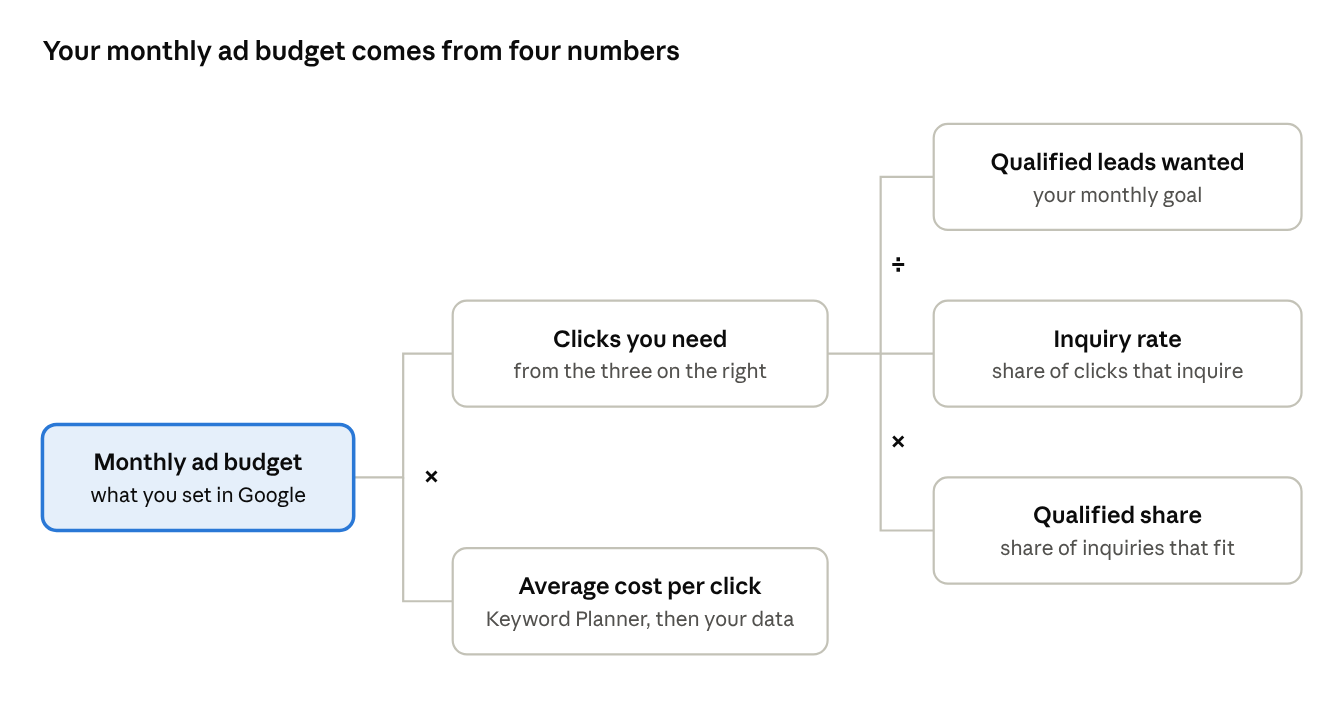
Clicks you need = Qualified leads wanted ÷ (Inquiry rate × Qualified share)
Monthly ad budget = Clicks you need × Average cost per click
A worked example
The numbers below are made up purely to show how the math works. They are not benchmarks. Replace them with your own figures.
- You want 4 qualified leads a month from Google Ads.
- Your landing page turns 5% of clicks into inquiries (inquiry rate).
- About 40% of those inquiries fit your budget, area, and timeline (qualified share).
- Keyword Planner and early results suggest an average cost per click of $12 in your market.
Clicks you need = 4 ÷ (0.05 × 0.40) = 4 ÷ 0.02 = 200 clicks
Monthly ad budget = 200 × $12 = $2,400
This simple calculation does three useful things:
- It gives you a realistic starting budget tied to an outcome, not a guess.
- It shows where to improve. Raise your inquiry rate with a better landing page, or your qualified share with better targeting and forms, and the same budget produces more qualified leads.
- It sets expectations. If the budget you’re comfortable with buys only 50 clicks a month, you’ll know that one or two qualified leads a month is a more realistic goal.
When you’re starting out, you won’t know your inquiry rate or qualified share yet. Use conservative guesses, run the campaign for a few months, then replace the guesses with real numbers from your own account.
How to Estimate Click Costs in Your Market
You don’t have to guess your cost per click. Google gives you tools to estimate it before you spend.
- Open Keyword Planner in your Google Ads account. Keyword Planner shows keyword ideas, estimated search volumes, and cost estimates. It requires a Google Ads account.
- Enter your target keywords, such as “custom home builder [town]” and “luxury home builder [town].”
- Set the location to your actual service area. Costs can vary a lot by place, so national numbers can mislead you.
- Review the top-of-page bid ranges. Google explains that the low and high top-of-page bid ranges roughly reflect the 20th and 80th percentile of what advertisers have paid for top-of-page placement in the selected locations over the past 30 days.
- Use the forecast tool to see estimated clicks, impressions, and cost for a given budget.
Treat these as estimates. For local and niche keywords, Keyword Planner may show limited data. Your own campaign’s results after a few weeks are always more reliable than any forecast.
Want a budget built around your market?
Talk to us. We will estimate click costs for your area and work backward from the number of qualified leads you want.
How Daily Budgets Work in Google Ads
In Google Ads, you set an average daily budget for each campaign. This confuses some builders, because daily spending can vary.
According to Google’s guide to average daily budgets:
- On busy days, a campaign may spend up to twice its average daily budget.
- Over a full month, you won’t be charged more than 30.4 times your average daily budget.
So to plan a monthly budget, divide it by 30.4. A $2,400 monthly budget, for example, is roughly a $79 average daily budget.
Is Google Ads Worth the Cost for a Custom Builder?
For most custom builders, the real question isn’t “how much does a click cost?” It’s “what does it cost to win a project, and is that worth it?”
That’s where custom building has an advantage. A single project is usually worth far more than the ad spend needed to win it. To judge whether your ads are paying off, track these numbers:
| Metric | How to calculate it | What it tells you |
|---|---|---|
| Cost per lead | Ad spend ÷ inquiries | How efficiently ads produce inquiries |
| Cost per qualified lead | Ad spend ÷ qualified inquiries | The true cost of a real opportunity |
| Cost per first meeting | Ad spend ÷ first meetings held | How much each sales conversation costs |
| Cost per signed project | Total ad spend ÷ projects signed from ads | What it costs to win a client |
| Return on ad spend | Gross profit from ad-sourced projects ÷ ad spend | Whether ads are profitable |
Because custom home sales cycles are long, judge return on ad spend over months, not weeks. A lead from this month may sign many months from now. Your reporting and analytics needs to connect each project back to its original source, or ads won’t get credit for the work they did.
How to Lower Your Cost per Qualified Lead
You can’t control what competitors bid. You can control how efficiently you turn spend into qualified leads.
- Add negative keywords weekly from your search terms report, so you stop paying for irrelevant searches.
- Target people physically in your service area instead of people merely interested in it.
- Write ads that qualify, naming your project type and price point, so poor-fit buyers don’t click.
- Build tightly themed ad groups so each ad closely matches its keywords. This supports ad relevance, one of Quality Score’s components.
- Send clicks to focused landing pages with relevant projects, reviews, and a qualifying form.
- Respond to inquiries fast. A slow response wastes the money you spent to get the lead.
- Track qualified leads as conversions, not just form fills, so Google’s automated bidding learns to find better buyers.
- Review ad schedule and device data once you have enough of it, and reduce spend where qualified leads rarely come from.
Common Budgeting Mistakes Builders Make
- Starting with a budget too small to learn anything, then concluding ads don’t work
- Spreading a small budget across too many keywords and towns
- Judging success by cost per click instead of cost per qualified lead
- Ending campaigns before long sales cycles can show results
- Paying for management without owning the ad account
- Ignoring the landing page, which often has more effect on cost per lead than bids do
Final Thoughts: Budget for Projects, Not Clicks
Google Ads doesn’t have a price tag, and that’s good news. It means you’re in control. You decide the budget, and the quality of your campaign decides how far it goes.
The builders who get the most from their spend think in terms of qualified leads and signed projects, not clicks. They estimate costs with Google’s own tools, set budgets by working backward from their goals, and steadily lower their cost per qualified lead with better targeting, ads, and landing pages.
For the bigger picture of how ads fit into your overall marketing spend, see How Much Should a Custom Home Builder Spend on Marketing? And if you’d like a budget built around your market and your goals, our Google Ads service for custom home builders starts with exactly that math. Book a strategy call to get started.
Budget for Projects, Not Clicks
We work only with custom home builders. Book a call and we will build your Google Ads budget around signed projects.
Frequently Asked Questions About Google Ads Costs for Home Builders
Q1. How much do Google Ads cost for home builders?
There’s no fixed price. You pay per click, and click prices are set by an auction based on your bid, ad quality, and local competition. You control total spend with your daily budget. Use Google’s Keyword Planner to estimate click costs in your area, then work backward from the number of qualified leads you want.
Q2. What is a good Google Ads budget for a custom home builder?
A good budget is one that buys enough clicks to produce your target number of qualified leads. Calculate it by dividing your lead goal by your inquiry rate and qualified share, then multiplying by your average cost per click. If you’re unsure, start with a budget that produces enough data to learn from in a few months.
Q3. Why are Google Ads clicks expensive for builders?
Home-related searches in affluent areas are often competitive, because many builders, remodelers, and real estate businesses bid on them. But because a single custom home project is so valuable, a click that seems expensive can still be very profitable if your campaign attracts the right buyers.
Q4. Do I pay my full bid for every click?
Usually not. Google says your actual cost per click is the least you need to pay to clear its thresholds and outrank the advertiser below you, so it’s usually lower than your maximum bid.
Q5. Can my Google Ads spend go over my budget?
On individual days, yes. Google says a campaign can spend up to twice its average daily budget on busy days. Over a month, you won’t be charged more than 30.4 times your average daily budget.
Q6. How long should a builder run Google Ads before judging results?
Give a new campaign a few months to gather data and improve. Because custom home sales cycles are long, judges return on ad spend over a longer period by tracking which projects started as ad leads.
Q7. Is it cheaper to do SEO instead of Google Ads?
SEO doesn’t charge you per click, but it takes time and investment to build. Ads deliver visibility quickly but stop when you stop paying. Most builders benefit from both. Read more in Is SEO Worth It for Home Builders?