
GOOGLE ADS
Google Ads for Custom Home Builders: How to Attract Serious Buyers, Not Tire-Kickers
Google Ads can bring serious buyers or a flood of tire-kickers. The difference is in the keywords, targeting, ad copy and landing page. Here is how to set it up right.
ESTIMATED READ TIME: 15 MINUTES
Want to skip the reading? Speak directly with our Director of Growth Strategy.
Most custom home builders who try Google Ads have the same story. The phone starts ringing, but the calls are wrong. People asking about cheap starter homes. Homeowners wanting a deck repaired. Someone looking for a builder job. A few weeks later, the budget is gone and the builder decides that “Google Ads doesn’t work for us.”
The problem usually isn’t Google Ads. It’s a campaign built for volume instead of fit.
A custom builder doesn’t need hundreds of leads. You need a small number of the right ones: families with land, a realistic budget, and a timeline. Google Ads can deliver those buyers, because it shows your ad at the exact moment someone searches for a builder. But only if every part of the campaign is set up to filter out everyone else.
This guide explains how to do that, step by step, from the keywords you choose to the way you track whether a lead actually turned into a project.
The short answer: Google Ads works for custom home builders when campaigns target high-intent searches like “custom home builder [town],” block low-fit searches with negative keywords, target only people physically in your service area, use ad copy that signals your price point, and send clicks to a focused landing page with a qualifying form. Track qualified leads, not just clicks or form fills.
Is Google Ads Right for a Custom Home Builder?
Google Ads can be a strong channel for builders, but it isn’t right for everyone at every stage. It tends to work well when:
- You want leads sooner than SEO can deliver them. SEO builds over months. Ads can put you in front of buyers as soon as a campaign is approved.
- You have a clear service area and price point. The tighter your focus, the easier it is to filter for fit.
- You have a website or landing page that converts. Ads send people to your site. If the site doesn’t build trust and make it easy to inquire, the money is wasted.
- You can respond quickly. A serious buyer who fills out a form and hears nothing for three days will call the next builder.
Ads work best alongside SEO, not instead of it. Ads capture demand now. SEO compounds over time and lowers your reliance on paid clicks. If you’re weighing the two, our article on whether SEO is worth it for home builders covers the long-term side.
Why Most Builder Ad Campaigns Attract Tire-Kickers
Before fixing a campaign, it helps to understand why so many go wrong. The most common causes are:
- Broad keywords without controls. A keyword like “home builder” can match searches for production homes, home building games, builder jobs, or home repair.
- No negative keywords. Without them, you pay for every irrelevant search Google decides is related.
- Loose location settings. By default, Google can show your ad to people outside your area who have merely shown interest in it.
- Generic ad copy. “Quality homes, call today!” attracts everyone. Nothing in it filters for budget or project type.
- Sending clicks to the homepage. A homepage tries to do everything. A focused landing page does one job: turn the right visitor into an inquiry.
- Measuring form fills instead of qualified leads. If Google’s system is told every form fill is a success, it learns to find more form fills, not more good clients.
Each of these is fixable. The sections below go through them in order.
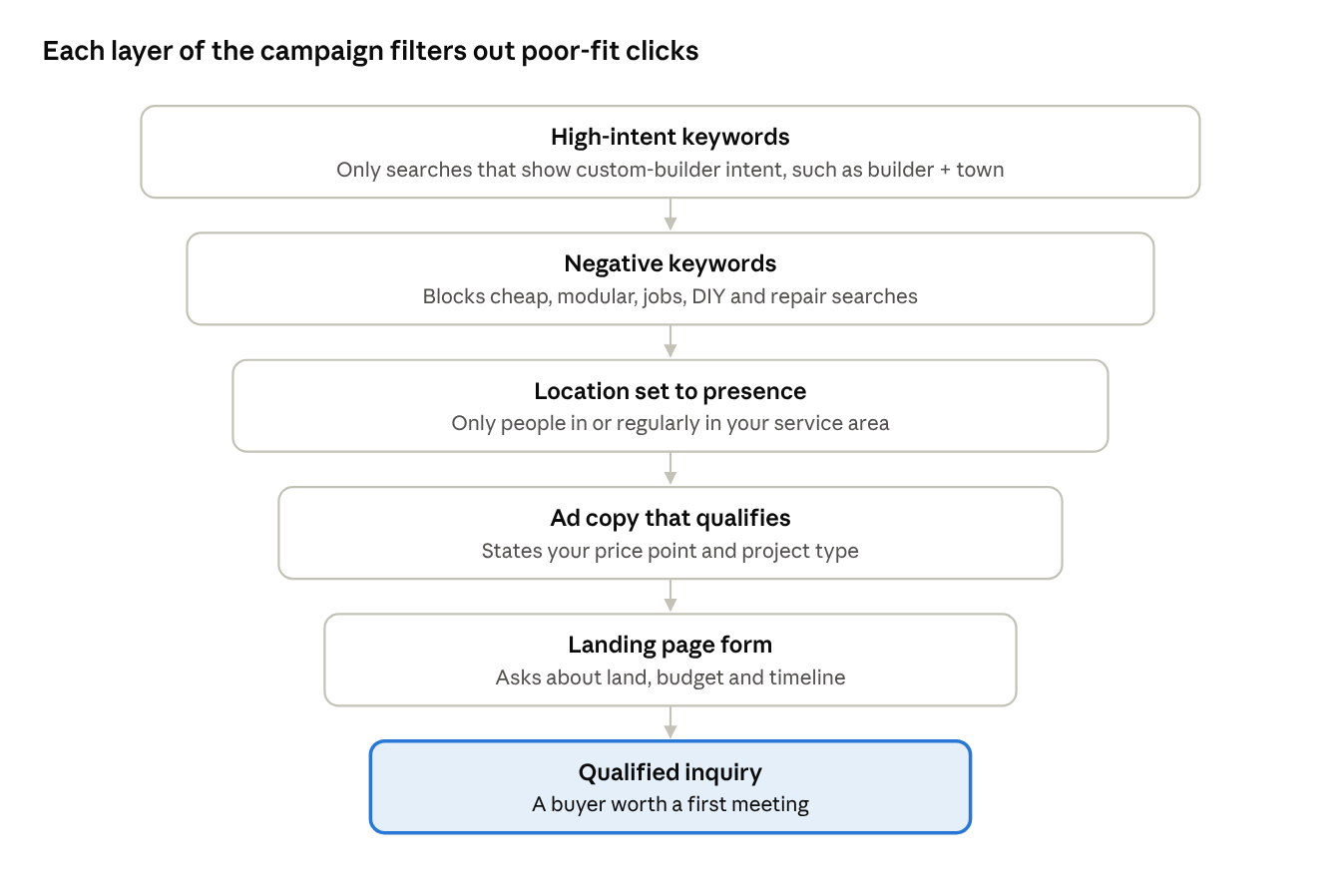
No single setting filters out every poor-fit lead. Together, these layers make sure most of your budget reaches people who could become clients.
Step 1: Start With a Search Campaign
Google Ads offers several campaign types, including Search, Display, Video, and Performance Max. For most custom builders, the best starting point is a Search campaign.
Search ads appear when someone types a query into Google. That means you’re reaching people who are actively looking for what you do, right now. It also gives you the most control over keywords, wording, and budget.
Other campaign types can play a role later, especially for staying in front of people who visited your site. But they’re better added once your search campaign is producing qualified leads and your tracking is in place.
Step 2: Choose Keywords That Signal a Serious Buyer
Keywords are the searches you want your ads to appear for. For a custom builder, the right keywords combine what the person wants with where they want it, and ideally a hint of budget or style.
Here’s how different keywords tend to compare:
| Keyword type | Examples | Typical buyer fit |
|---|---|---|
| Custom builder + location | custom home builder Boulder, custom home builders near me | Strong. Clear intent and location |
| Luxury or style + builder | luxury home builder Scottsdale, modern custom home builder | Strong. Signals budget and taste |
| Build-on-your-lot | build on your lot Austin, builders who build on your land | Strong. The buyer often already owns land |
| Design-build | design build firm Denver, design build custom homes | Good. Often a more involved buyer |
| Generic builder terms | home builders, new homes | Weak. Often production or tract-home shoppers |
| Cost research | cost to build a house, how much to build a custom home | Mixed. Early research, may need nurturing |
| Job and DIY searches | home builder jobs, how to build a house yourself | Poor. Not buyers |
A few practical tips:
- Start narrow. A focused list of high-intent keywords usually beats a long list of loosely related ones.
- Group keywords by theme. Put “custom home builder” keywords in one ad group and “luxury home builder” keywords in another, so each ad can match the search closely.
- Use Google’s Keyword Planner for research, but don’t chase the biggest numbers. High-volume terms are often the least qualified.
Step 3: Use Match Types to Control Which Searches Trigger Your Ads
In Google Ads, each keyword has a match type. Google explains three match types:
- Broad match (written with no symbols, like custom home builder) can show your ad for related searches, even ones that don’t contain your words. It reaches the most people but gives you the least control.
- Phrase match (written in quotes, like “custom home builder”) shows your ad for searches with the same meaning, including more specific versions.
- Exact match (written in brackets, like [custom home builder boulder]) shows your ad for searches with the same meaning or intent. It gives you the most control and the smallest reach.
For builders with modest budgets, phrase and exact match usually give a better starting point, because they keep your ads closer to the searches you chose. Broad match can work well later, when paired with Smart Bidding and strong conversion data, but on a new account it can spend quickly on loosely related searches.
Step 4: Build a Strong Negative Keyword List
Negative keywords tell Google which searches your ads should not appear for. For builders, this is one of the most important tools for keeping out tire-kickers.
Start with a list like this, then adjust it for your business:
| Category | Example negative keywords |
|---|---|
| Low budget | cheap, affordable, budget, low cost, inexpensive |
| Other home types | modular, manufactured, mobile, prefab, kit homes, tiny house, shed |
| Other builders’ products | tract, spec home, production, model home (if you don’t sell these) |
| Jobs and careers | jobs, careers, hiring, salary, apprenticeship, resume |
| DIY and education | DIY, how to build, yourself, course, degree, software, game |
| Small projects | repair, handyman, deck, fence, roof repair, remodel (if you don’t do these) |
| Rentals | rent, rental, apartment, lease |
Two important details from Google’s guide to negative keywords:
- Negative keywords don’t automatically cover close variations. If you block “cheap,” you may also need to add “cheapest.” Google says you need to add synonyms and singular or plural versions yourself.
- Too many negatives can limit your reach. Block what clearly doesn’t fit, but don’t overdo it.
Your negative list is never finished. Review your search terms report, which shows the real searches that triggered your ads, at least weekly in the first months. Every irrelevant search you find is a new negative keyword.
Step 5: Target Only People in Your Service Area
This setting quietly wastes a lot of builder budgets.
According to Google’s location targeting guide, the default setting can show your ads to people who are physically in your target area and to people who have only shown interest in it. For a builder, the second group can include people browsing from other states with no real plans to move.
There’s an exception worth considering. Some buyers are relocating, such as a family moving from California to Colorado. If relocation buyers matter to your business, you might keep the broader setting in a separate campaign with tighter keywords that signal intent, such as “custom home builder in [town].”
For most campaigns, though:
- Choose “Presence” (people in or regularly in your targeted locations) in the advanced location options.
- Target the specific towns, counties, or a radius that matches where you actually build.
- Exclude areas you don’t serve, if your target region borders places you’d rather not work.
A note on Google’s housing ad rules
Google has a specific policy for housing ads in the United States and Canada. It covers ads that offer homes for sale or rent and related services. For these ads, Google doesn’t allow targeting by gender, age, parental status, marital status, or ZIP code. City targeting and radius targeting of at least 1 km are allowed.
If your ads promote homes for sale, such as spec homes or finished inventory, these rules apply. Even if you only advertise custom building services, it’s wise to target by city, county, or radius rather than ZIP code and to avoid demographic targeting. It keeps your campaign compliant and avoids disapproved ads.
Step 6: Write Ad Copy That Qualifies, Not Just Attracts
Most ad copy tries to get as many clicks as possible. For a custom builder, that’s the wrong goal. Every click costs money, so you want your ad to attract the right buyer and gently turn away the wrong one.
Ways to do that:
- Signal your price point. Phrases like “Custom Homes From $1.5M” or “Luxury Custom Homes” tell budget shoppers this isn’t for them. Only state a figure you’re comfortable standing behind.
- Name the project type. “Build on Your Lot,” “Design-Build Custom Homes,” or “Modern Mountain Homes” attracts buyers who want exactly that.
- Name the location. “Serving Boulder & Jefferson Counties” reassures local buyers and discourages out-of-area clicks.
- Show proof. Years in business, number of homes built, awards, or your review rating, as long as each claim is accurate and current.
- Use a clear, low-pressure call to action. “Schedule a Lot Consultation” or “Request a Project Review” fits a high-value buyer better than “Call Now!”
Example search ad (for illustration only):
Headlines (up to 30 characters each): Custom Home Builder in Boulder | Homes From $1.5M | Build on Your Lot
Description 1 (up to 90 characters): Design-build custom homes on hillside and mountain lots across Boulder County.
Description 2: Fixed-price contracts and weekly updates. Schedule a lot consultation today.
Also add assets (formerly called extensions), which give your ad extra space and links. Useful ones for builders include sitelinks to your portfolio and process pages, call assets so mobile users can call directly, and image assets showing finished homes.
Google also offers lead form assets, which let people submit their details without leaving Google. They can be convenient, but they can also produce lower-quality leads because they’re so easy to fill out. If you test them, add qualifying questions.
Paying for clicks that never become projects?
Talk to us. We will review your campaign and show you where the wrong buyers are getting in.
Step 7: Send Clicks to a Landing Page Built for One Job
Where you send people after the click matters as much as the ad itself.
A homepage usually tries to do everything: tell your story, show every project, link to every service. A dedicated landing page has one job: turn the right visitor into an inquiry.
A strong builder landing page usually includes:
- A headline that matches the ad. If the ad says “Build on Your Lot in Boulder,” the page should say the same thing.
- Three to six of your best relevant projects, with locations.
- A short explanation of your process, from first meeting to move-in.
- Real reviews or testimonials, ideally from clients with similar projects.
- Clear trust signals, such as years in business, licenses, warranties, and associations.
- One clear call to action and a form.
- A form that qualifies. Ask a few simple questions: Do you own land? Where? What’s your target budget range? When do you hope to start? Are you working with an architect?
That last point is important. Some builders worry that extra questions will reduce form fills. They might. But for a custom builder, fewer, better leads usually beat more, worse ones. We cover this in depth in How to Qualify Custom Home Leads Before the First Meeting.
If your landing pages aren’t converting, start with our guide on why home builder websites don’t get leads.
Step 8: Track Qualified Leads, Not Just Clicks
This is the step that separates campaigns that improve over time from campaigns that drift.
Google Ads uses conversion tracking to learn which keywords and ads produce results. If you tell it every form fill is a success, it will look for more form fills, including from poor-fit buyers. If you tell it which leads became qualified opportunities, it can learn to find more of those.
At minimum, track:
- Form submissions from your landing pages
- Phone calls from your ads and from your website
Then go further:
- Mark which leads were qualified in your CRM or lead tracker.
- Send that information back to Google Ads. Google offers ways to import offline results, including enhanced conversions for leads, which uses first-party data from your CRM, hashed for privacy, to connect ad clicks with leads that later became qualified or signed.
Custom home sales cycles are long, often many months. Feeding back “qualified lead” or “consultation booked” gives the system a useful signal much sooner than waiting for a signed contract.
Our reporting and analytics service sets up this kind of tracking so you can see exactly which campaigns produce real projects.
Step 9: Choose a Bidding Approach and Budget
Once conversion tracking is in place, you can choose how Google sets your bids.
- Starting out: Many builders begin with Maximize Clicks with a maximum cost-per-click limit, or with Manual CPC, to gather data while keeping costs under control.
- Once you have steady conversion data: Smart Bidding strategies, such as Maximize Conversions or Target CPA, let Google adjust bids automatically for each auction. These work best when your conversion data reflects qualified leads, not just any form fill.
Your budget should be large enough to get meaningful data in your market, but not so large that you’re spending on broad, untested keywords. Costs vary widely by market and competition. We break this down in How Much Do Google Ads Cost for Home Builders? and in our guide on how much a custom home builder should spend on marketing.
Ad costs are also influenced by ad quality. Google’s Quality Score is a diagnostic that reflects how relevant your ads, keywords, and landing pages are. Tight keyword groups, matching ad copy, and focused landing pages tend to improve it.
Step 10: Manage the Campaign Every Week
Google Ads isn’t set-and-forget. A simple weekly routine keeps a builder campaign healthy:
- Review the search terms report and add new negative keywords.
- Check lead quality with whoever answers calls and forms. Which leads were a fit? Which weren’t? Why?
- Pause keywords that spend without producing qualified leads.
- Test new ad copy against your best-performing ads.
- Check your landing page loads quickly and the form works on mobile.
- Review budget pacing, especially around holidays and seasonal shifts.
Monthly, step back and ask the bigger question: how many qualified leads and consultations did ads produce, and what did each one cost?
Common Google Ads Mistakes Custom Home Builders Make
- Using broad match keywords on a new account with no negative keywords
- Leaving location targeting on the default “presence or interest” setting without a reason
- Running ads that could belong to any builder, with no price or project signal
- Sending ad traffic to the homepage
- Counting every form fill as a conversion
- Letting leads wait days for a response
- Turning off a campaign after a few weeks instead of fixing what’s wrong
- Never reviewing the search terms report
Final Thoughts: Pay for the Right Clicks Only
Google Ads doesn’t fail builders. Poorly built campaigns do. When every layer of your campaign is designed to filter for fit, from keywords and negatives to location settings, ad copy, and your landing page form, your budget goes toward the families who can actually become clients.
Start small and focused. Track qualified leads, not just clicks. Review the real searches behind your ads every week. Improve one layer at a time. That’s how a campaign that once produced tire-kickers becomes a steady source of first meetings with serious buyers.
If you’d like an expert review of your current campaign, or help launching one the right way, our Google Ads service for custom home builders is built for exactly this. Talk to our team and we’ll show you where your budget is going today.
Pay for the Right Clicks Only
We work only with custom home builders. Book a call and we will build a Google Ads campaign around serious buyers, not tire-kickers.
Frequently Asked Questions About Google Ads for Home Builders
Q1. Do Google Ads work for custom home builders?
Yes, when they’re set up for fit rather than volume. Google Ads can put your business in front of buyers at the moment they search for a builder. Results depend on choosing high-intent keywords, using negative keywords, targeting the right area, writing qualifying ad copy, and sending clicks to a focused landing page.
Q2. What keywords should a custom home builder bid on?
Focus on searches that combine a builder type with a location or style, such as “custom home builder [town],” “luxury home builder [town],” or “build on your lot [area].” Avoid generic terms like “home builders” or “new homes” until you have strong controls in place, because they often attract production-home shoppers.
Q3. How do I stop getting low-quality leads from Google Ads?
Add negative keywords for low-budget and irrelevant searches, set location targeting to people physically in your area, state your price point in your ads, and add qualifying questions to your form. Then review your search terms report weekly and track which leads were qualified.
Q4. Should builders use Performance Max campaigns?
Performance Max can work for some builders, but it gives you less control over where ads appear and which searches trigger them. Most builders are better off starting with a Search campaign, building solid conversion tracking, and testing other campaign types later.
Q5. Are there special Google Ads rules for home builders?
Google has a housing ads policy for the United States and Canada. For ads that offer homes for sale or rent, it doesn’t allow targeting by age, gender, parental status, marital status, or ZIP code. If you sell spec homes or finished inventory, these rules apply. Builders advertising custom building services are wise to follow the same approach.
Q6. How long does it take for Google Ads to work for builders?
Ads can start showing as soon as they’re approved, so calls can begin quickly. But a campaign usually needs a few months of data and adjustments, such as adding negative keywords and testing ads, before it settles into consistent, qualified results.
Q7. Is Google Ads or SEO better for a home builder?
They do different jobs. Google Ads brings leads quickly while you pay for each click. SEO takes longer but builds lasting visibility. Most builders get the best results from a mix: ads for immediate demand and SEO for long-term growth.