
BUILDER INSIGHTS
Why Isn’t My Home Builder Website Getting Leads?
It is rarely the design. Here are the seven problems that keep builder websites quiet, how to find yours in 30 minutes, and what to fix first.
ESTIMATED READ TIME: 12 MINUTES
Want to skip the reading? Speak directly with our Director of Growth Strategy.
A home builder website that is not getting leads almost always has one of two problems: the right buyers are not finding it, or the buyers who find it do not see enough reason to get in touch. Underneath those two sit seven specific causes. The site is invisible in search, it attracts the wrong visitors, it does not say clearly what you build and where, it shows photos without proof, it hides the next step, it is slow or awkward on a phone, or inquiries arrive and then go cold.
The frustrating part is that none of these are obvious from the inside. You know your work is good, so your site looks fine to you. A homeowner about to commit a seven-figure sum and a year or more of their life sees it differently. They leave without telling you why.
This article walks through all seven causes, how to check your own site for each one in about 30 minutes, and the order to fix them in. We audit builder websites at the start of every engagement, and the pattern is consistent: the problem is rarely how the site looks. It is almost always clarity, proof or follow-up.
First, find out where the leads are leaking
A lead is the end of a chain. A buyer has to find your site, be the right kind of buyer, trust what they see, know what to do next, and then hear back from you quickly. A break anywhere in that chain looks exactly the same from your side: a quiet inbox.
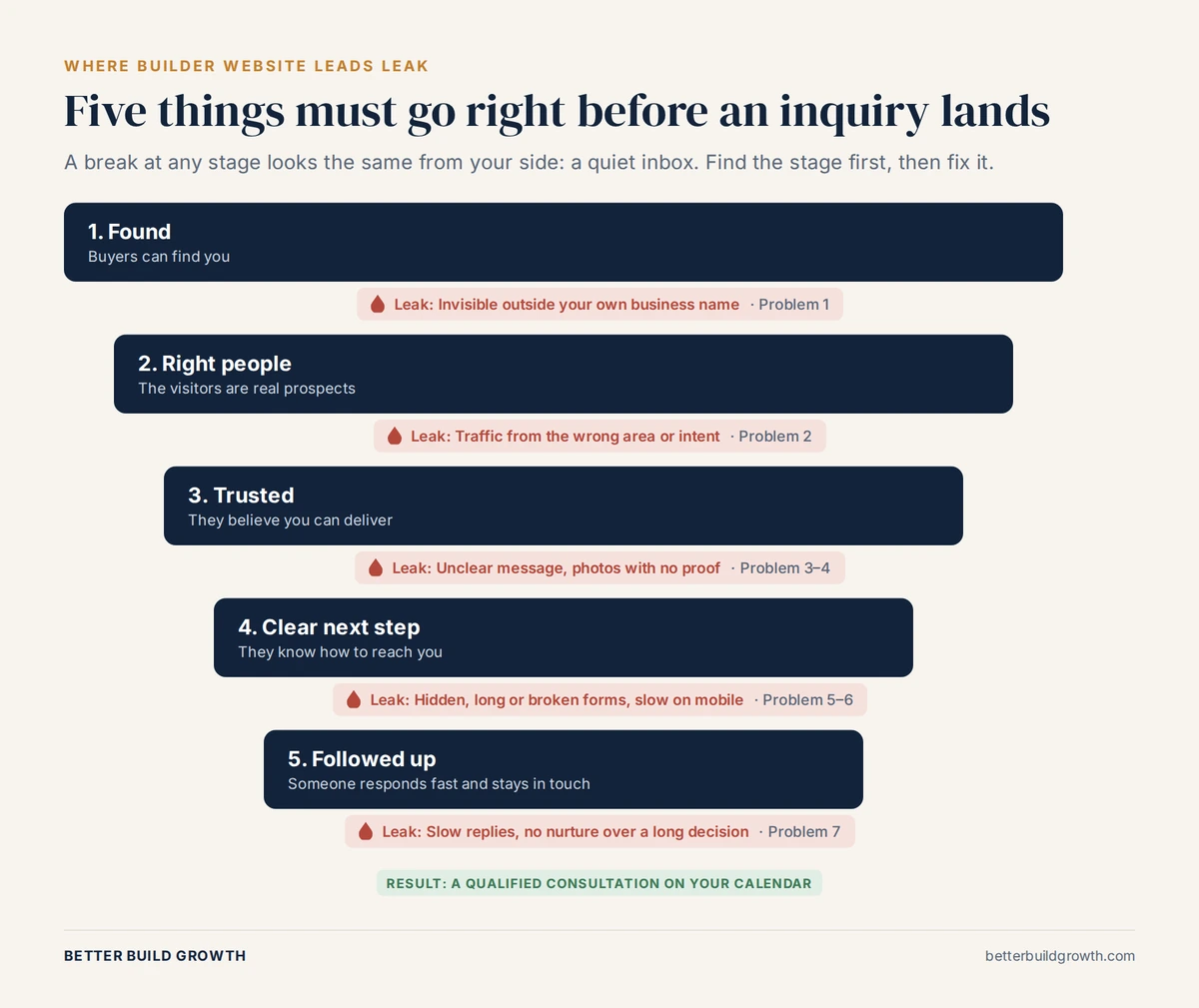
Five things must go right before an inquiry lands. A break at any stage looks the same from your side.
So before you change anything, find the stage where the chain breaks. You need two free tools from Google: Search Console, which shows how your site appears in search, and Google Analytics, which shows what visitors do once they arrive.
| What you see | What it usually means | Where to look |
|---|---|---|
| Very few impressions for anything except your business name | Buyers cannot find you | Problem 1 |
| Impressions and clicks, but for the wrong searches or from outside your build area | You are attracting the wrong visitors | Problem 2 |
| The right visitors arrive, then leave after one page | Your message or your proof is not landing | Problems 3 and 4 |
| Visitors look around but rarely call or submit the form | The next step is unclear, hard or slow | Problems 5 and 6 |
| Inquiries come in but rarely become consultations | Follow-up or qualification is breaking down | Problem 7 |
One warning before you trust any of this data: check that your tracking works. When we audit builder sites, it is common to find a contact form that is not tracked at all, phone calls that are never recorded, or a form that sends inquiries to an inbox nobody checks. If you cannot see your leads, you cannot tell which stage is broken. This is exactly what proper reporting and attribution is for.
The 7 reasons your home builder website is not getting leads
1. Buyers cannot find your website
Most builder websites rank for the business name and very little else. That means the site only works for people who already know you. Anyone who searches “custom home builder near me,” “custom home builder in [your town]” or “cost to build a custom home in [your county]” meets someone else.
How to check: In Search Console, open the Performance report, set the date range to the last three months, and filter out any search that contains your business name. What is left is your visibility to new buyers. If that list is short and the impressions are low, the site is effectively invisible to anyone who has not already heard of you.
Common causes:
- No Google Business Profile, or one that is incomplete, uses the wrong category or has few reviews
- A single “Services” page instead of a separate page for each type of home you build
- No pages for the towns and communities you actually build in
- Technical problems that stop Google indexing your pages
- A new domain with no history yet
What to do: Start with your Google Business Profile, because it is the fastest route into local results. Then build a page for each core service and each genuine market you serve, and add content that answers the questions buyers type while they research. Our guide to how long SEO takes for a construction company sets out a realistic timeline, and our SEO service for custom home builders is built around it.
A note on AI search: Buyers now also research through AI Overviews and AI assistants. Google’s own guidance is that there are no extra requirements to appear in AI Overviews or AI Mode; the same SEO fundamentals apply. A site that is invisible in normal search is usually invisible there too.
2. It attracts the wrong visitors
Traffic is not the goal. A blog post that ranks nationally for “small house plans” can bring in thousands of visitors who will never build a custom home in your county. Your traffic chart looks healthy and your inbox stays empty.
How to check: Look at the searches in Search Console and the visitor locations in Google Analytics. Are the searches commercial and local, such as “custom builder,” “build on my lot” or “home builder” plus a place name you serve? Are most visitors in your build area? If you run Google Ads, check the search terms report as well. Broad targeting often pays for clicks from remodel shoppers, renters and people looking for house plans.
What to do: Target intent, not volume. The searches that matter are the ones buyers make when they are close to choosing a builder: builder plus location, cost to build in a specific area, the building process, and questions about lots and design. If you run paid search, tighten match types, add negative keywords and restrict locations to where you actually build. See our approach to paid ads for builders.
3. It does not say clearly what you build, where, and for whom
Try the five-second test. Show your homepage to someone who does not know your business for five seconds, then close it. Ask them three questions: What does this company build? Where? For roughly what kind of budget?
If they cannot answer, neither can a buyer.
The usual culprit is a headline like “Building Dreams Since 1998” or “Quality Craftsmanship You Can Trust.” Every builder says this, so it tells the buyer nothing. Compare it with something like “Custom homes on your lot across [County], from design to move-in.” That one line tells the right buyer they are in the right place, and tells the wrong buyer to move on. Both outcomes are useful.
The price question. Many builders refuse to say anything about cost on their website. We understand why: every project is different. But cost is one of the first things buyers research, and a site that says nothing forces them to guess. A simple line such as “Most of our homes fall between $X and $Y, depending on size, lot and finishes” helps the right buyers feel confident and filters out the ones who were never a fit. You do not need a price list. You need a range and an honest explanation of what drives it. We cover how to do this in what a custom home builder website should include.
4. It shows beautiful photos but no proof
Photos prove you can build a beautiful house. They do not prove that building with you will go well, and that is what the buyer is really worried about. Will the budget hold? Will the timeline slip? Will you return calls? What happens when something goes wrong?
Proof that answers those fears looks like this:
- Project stories, not just galleries. The lot, the challenge, the decisions, the timeline and what the client said at the end. We explain why beautiful homes don’t always create great marketing.
- Reviews on the page, with a link to your Google Business Profile so buyers can check they are real.
- Named people. Who owns the company, who runs the build, and their experience. Google’s own guidance on creating helpful, reliable content asks whether it is clear who is behind the content. A faceless builder site fails that test for buyers too.
- Your process, written down, so buyers can picture working with you.
- Warranty, licensing and insurance details where they apply in your state.
- Endorsements from architects and designers you have worked with.
If your reviews are thin, fix that first. It is one of the highest-return things a builder can do, and we explain how custom home builders get more Google reviews. Our reputation service builds the system for you.
5. It hides or complicates the next step
Even buyers who like what they see will leave if the next step is unclear or feels like hard work. The most common problems we find:
- The only way to get in touch is a generic contact page
- The form asks for too much before offering anything back
- The budget question feels like a test the buyer might fail
- The phone number is missing or not clickable on mobile
- The button says “Submit” and nothing explains what happens next
- There is nothing for buyers who are still 12 months away from building
That last one matters more than most builders realize. Custom home buyers research for a long time, so many of your visitors are not ready to call today. If “contact us” is the only option, you lose every one of them.
What to do:
- Use one clear primary action and repeat it: for example, “Book a discovery call” or “Talk to us about your build.”
- Add a lower-commitment option for early researchers, such as a planning guide, a cost guide for your area or a lot evaluation checklist in exchange for an email address.
- Keep the form short and make the questions feel useful: where you plan to build, whether you own a lot, your timeframe, and a budget range picked from a dropdown.
- Explain what happens next: “We will call you within one business day. The first conversation takes about 30 minutes and there is no obligation.”
- Make the phone number tap-to-call on every mobile page.
Our lead generation service is built around getting this step right.
6. It is slow or awkward on a phone
Google predominantly uses the mobile version of a site for indexing and ranking, a practice it calls mobile-first indexing. Many buyers will also meet your website for the first time on a phone, perhaps after seeing a job-site sign or hearing your name from a friend.
Builder websites are especially prone to being slow because they are full of large project photos. Google measures page experience through its Core Web Vitals. For a good experience, Google recommends:
- Largest Contentful Paint (loading): within 2.5 seconds
- Interaction to Next Paint (responsiveness): under 200 milliseconds
- Cumulative Layout Shift (visual stability): under 0.1
How to check: Run your homepage and your main gallery page through PageSpeed Insights, and check the Core Web Vitals report in Search Console. Then open your site on your own phone and try to call you and fill in your form.
What to do: Compress images and use modern formats such as WebP, load galleries below the fold only as visitors scroll, avoid autoplay video in the hero area on mobile, and add a sticky “call” or “book” button to the bottom of the screen. A website built for builders should handle all of this from day one.
7. Leads arrive, but nobody follows up properly
This is not strictly a website problem, but it looks like one. An inquiry sits in an inbox for three days, and by the time you call back, the buyer has already booked a meeting with the builder who replied that afternoon. Or the first call goes well, the buyer says “we’re about a year away,” and nobody ever contacts them again.
How to check: Submit your own contact form right now. How long before someone replies? Does the notification go to someone who checks it every day? What happens to a lead who is not ready yet?
What to do:
- Send an instant, personal-sounding confirmation email or text
- Reply personally within the same business day
- Log every inquiry in a CRM so none slip through
- Keep in touch with longer-term buyers through useful, occasional emails over their decision cycle
We cover the wider picture in how custom home builders get leads. Follow-up is usually the cheapest fix with the fastest payback.
Not sure which of the seven is costing you leads?
Talk to us. We will review your site, your Search Console data and your inquiry process, and tell you exactly where the leak is.
A 30-minute self-audit you can do today
You do not need an agency to find the problem. Work through these six checks in order and write one line for each: working, or not working.
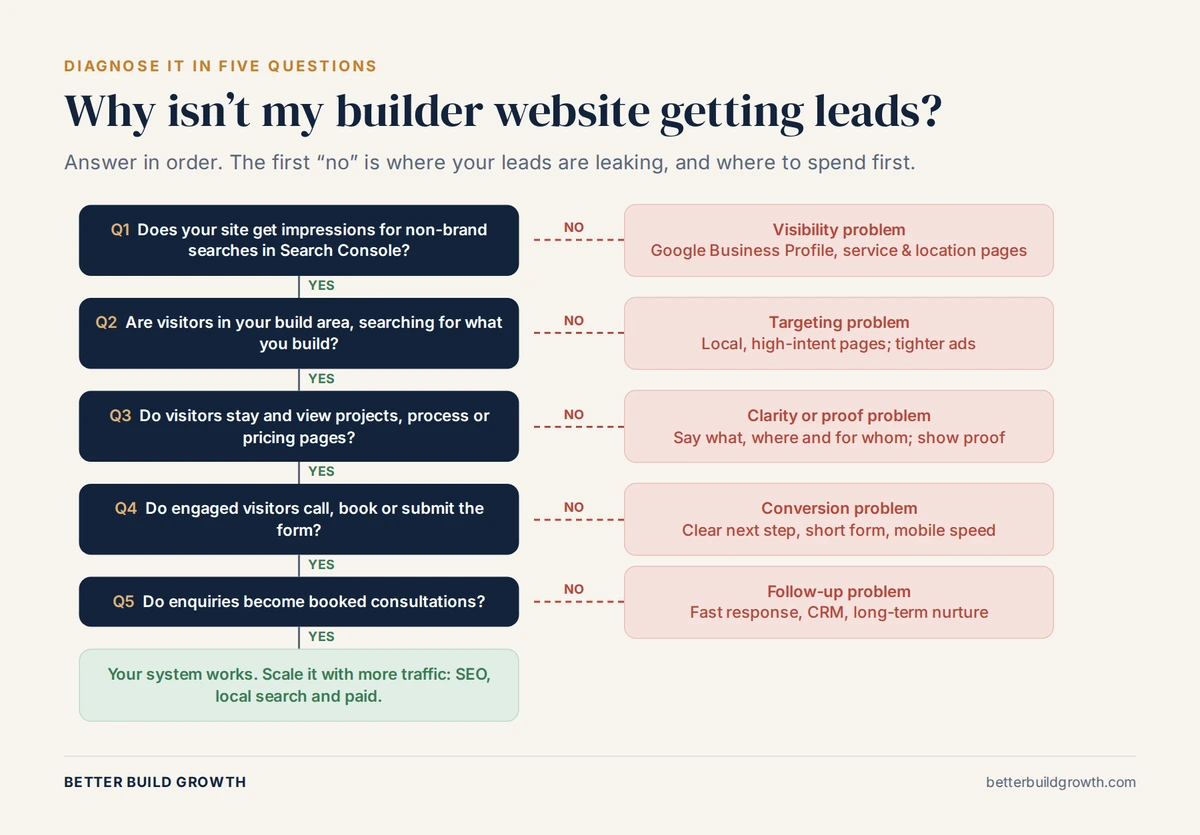
Answer in order. The first “no” is where your leads are leaking.
- Test your own contact paths (5 minutes). Submit your form and call your number from your mobile. Did you get a confirmation? Who received the inquiry, and how fast would they have replied?
- Run the five-second test (5 minutes). Show your homepage to someone outside the business. Can they say what you build, where and for roughly what budget?
- Check non-brand visibility (5 minutes). In Search Console, look at the last three months with your business name filtered out. Are you appearing for searches that buyers actually make?
- Check who is visiting (5 minutes). In Google Analytics, look at visitor locations, your most-visited pages, and whether form submissions and calls are recorded as key events.
- Test mobile speed (5 minutes). Run your homepage and main gallery page through PageSpeed Insights.
- See what buyers see (5 minutes). On your phone, in a private browser window, search “custom home builder” plus your main town. Where do you appear in the map results and the organic results? How does your Google Business Profile compare with the other builders on that page?
The first check you fail is where to start.
What to fix first
Order matters. Driving more traffic to a site that cannot convert it just means paying for more people to leave. Fix the bottom of the chain before the top.
| Priority | Fix | Why it comes first | When you should see an effect |
|---|---|---|---|
| 1 | Working forms, call tracking and fast follow-up | Protects every lead you already get | Immediately |
| 2 | A clear message and a clear next step | Makes your existing traffic convert | Within weeks |
| 3 | Proof: project stories, reviews, named team | Lowers the buyer’s sense of risk | Within weeks |
| 4 | Mobile speed | Stops buyers leaving before the page loads | Days to weeks |
| 5 | Google Business Profile and reviews | Fastest route into local search | Typically 2 to 8 weeks |
| 6 | Service pages, area pages and helpful content | Builds visibility you own | Typically 4 to 12 months |
| 7 | Paid search | Buys visibility on demand, once the site converts | Within weeks of launch |
This is the same principle we set out in how custom home builders get leads: fix the destination before you drive traffic to it.
When a redesign is the answer, and when it isn’t
When a website is not producing leads, the reflex is to redesign it. Often that is the wrong call. A new look with the same vague message, the same missing proof and the same slow follow-up will produce the same results. A redesign can also lose rankings you already have if page addresses change without proper redirects.
A redesign is justified when:
- You cannot edit the site yourself, or every change needs a developer
- The site cannot be made fast on mobile without rebuilding it
- The structure cannot support separate service, area and project pages
- The design no longer reflects the level of home you build
If none of those apply, fix what you have first. If they do, rebuild around conversion from the start. That is the approach behind our website service for custom home builders, and it is why we look at what buyers find when they research you before we design anything.
The bottom line
If your home builder website is not getting leads, the cause is almost never a single dramatic failure. It is usually a small break somewhere in the chain: buyers cannot find you, the wrong people arrive, the site does not answer the questions that matter, the next step is unclear, or inquiries go cold.
The fix starts with finding the break, not with a redesign. Test your own form, run the five-second test, check what Search Console says about your visibility, and fix the bottom of the chain before you pay for more traffic. Most builders find their biggest leak within an afternoon.
If you would rather have someone else find it, tell us where your marketing stands. We work only with custom home builders, and we will give you a straight answer about what is costing you leads and what to fix first.
Read next: What should a custom home builder website include?
Find Out Where Your Leads Are Leaking
We work only with custom home builders. Book a call and we will review your website, your search visibility and your inquiry process, and tell you what to fix first.
Frequently Asked Questions
Q1. Why is my home builder website getting traffic but no leads?
Usually because the traffic is the wrong traffic, or because the site does not give the right visitors a reason and a way to act. Check where visitors are located and which searches bring them in. If they are real buyers in your area, look at your message, your proof and your contact options. A site that does not say what you build, where and at roughly what price, or that only offers a generic contact form, will lose most of its visitors.
Q2. How do I know if my builder website is working?
Track three things: qualified inquiries from the website each month, how many become consultations, and how many become signed projects. Set up form submissions and phone calls as key events in Google Analytics so you can see which pages and channels produce them. Traffic on its own tells you very little.
Q3. Should I put prices on my custom home builder website?
You do not need a price list, but you should give buyers a sense of scale. A typical range, an explanation of what drives cost, and what is included will attract buyers who fit your projects and filter out the ones who do not. Saying nothing forces buyers to guess, and many will guess you are out of reach or simply move on to a builder who is more open.
Q4. Do I need a new website to get more leads?
Not always. Most lead problems come from an unclear message, missing proof, a hidden next step or slow follow-up, and all of these can be fixed on your current site. A rebuild makes sense if you cannot edit the site, it cannot be made fast on mobile, or its structure cannot support separate service, area and project pages.
Q5. How long does it take for a new builder website to generate leads?
It depends on where the leads come from. Leads from people who already know your name can start immediately. Leads from Google Business Profile and local search typically take a few weeks to a couple of months. Leads from organic search usually take four to twelve months for a new site. Paid search can produce inquiries within weeks, as long as the site converts.
Q6. Why are the leads from my website poor quality?
Usually because the site is not filtering. If your pages do not say what you build, where you build and roughly what it costs, you will attract remodel requests, buyers outside your area and budgets you cannot work with. Clear positioning, a price range and a short form with qualifying questions will reduce the volume of bad-fit inquiries and improve the rest.
Q7. Does my website affect whether I show up in AI search results?
Yes. AI Overviews and AI assistants draw on content published on the web. Google says the same SEO best practices apply to its AI features: pages that can be crawled, content in text rather than images, a good page experience and accurate business information. A builder site that answers buyer questions clearly and specifically is more likely to be surfaced than one that relies on photos and slogans.