
BUILDER INSIGHTS
What Should a Custom Home Builder Website Include?
The pages, proof and features that turn a cautious buyer into a booked consultation, plus a checklist you can score your own site against.
ESTIMATED READ TIME: 13 MINUTES
Want to skip the reading? Speak directly with our Director of Growth Strategy.
A custom home builder website should include eight core pages: a homepage that says what you build and where, a project portfolio with case studies, your building process, your services, the areas you build in, cost guidance, reviews, and an about page that names your team. It also needs a simple contact page with a short form. Across every page, it needs visible proof, one clear next step, fast mobile performance, and the technical basics that help Google and AI search understand who you are and where you build.
Most builder websites have some of this. Very few have all of it. The missing pieces are usually the ones buyers care about most: what it costs, how the process works, and what it was actually like for past clients.
Below, we go through each element: why it matters to someone about to spend seven figures on a home, what good looks like, and the mistakes we see most often when we audit builder websites. At the end, there is a checklist you can use to score your own site.
Start with the buyer’s questions, not a brochure
A custom home buyer arrives with a short list of questions. Can you build what I want? Do you build where I have land? Can I afford you? Will this go well? Who will I be dealing with? What happens next?
A good builder website is simply a set of pages that answer those questions, in that order, with proof.
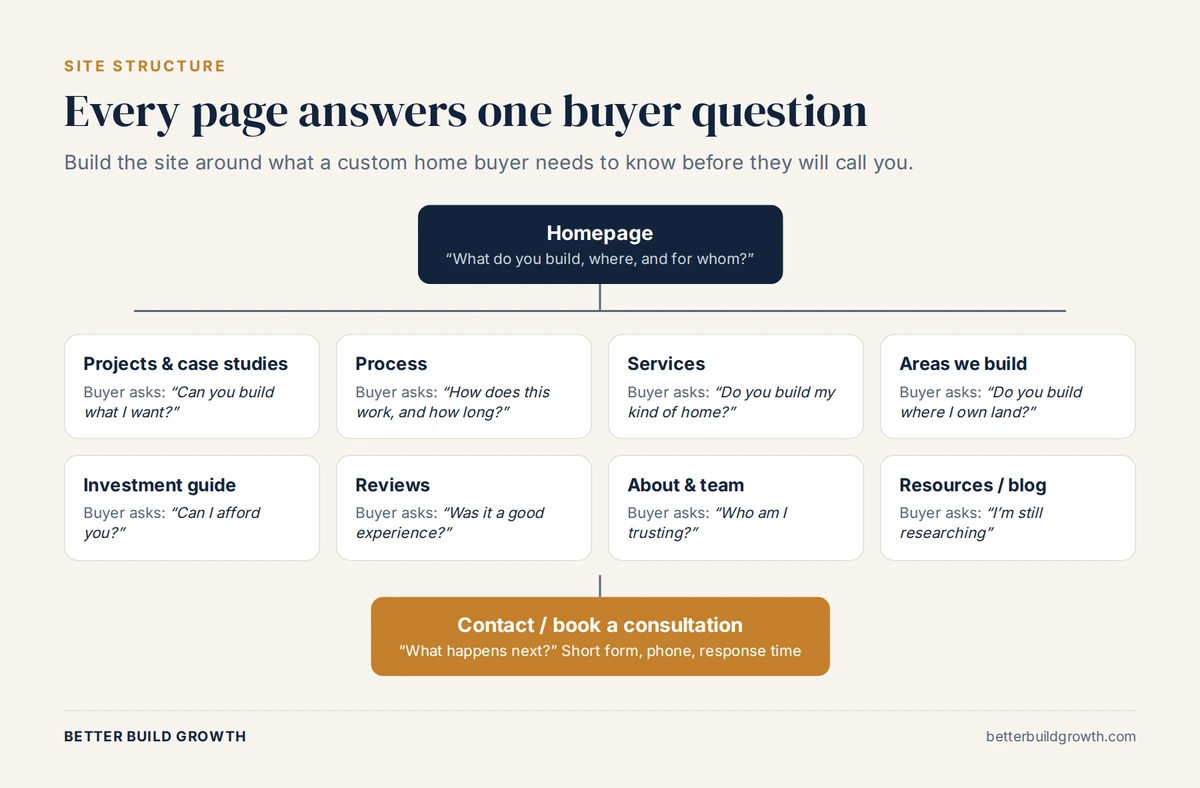
Every page on a builder website should answer one question a buyer has before they call.
If a buyer cannot find the answer to one of those questions on your site, they will look for it on another builder’s site. That is the whole case for everything below.
The core pages every custom home builder website needs
1. A homepage that says what, where and for whom
Your homepage has one job: to tell the right buyer, within a few seconds, that they are in the right place.
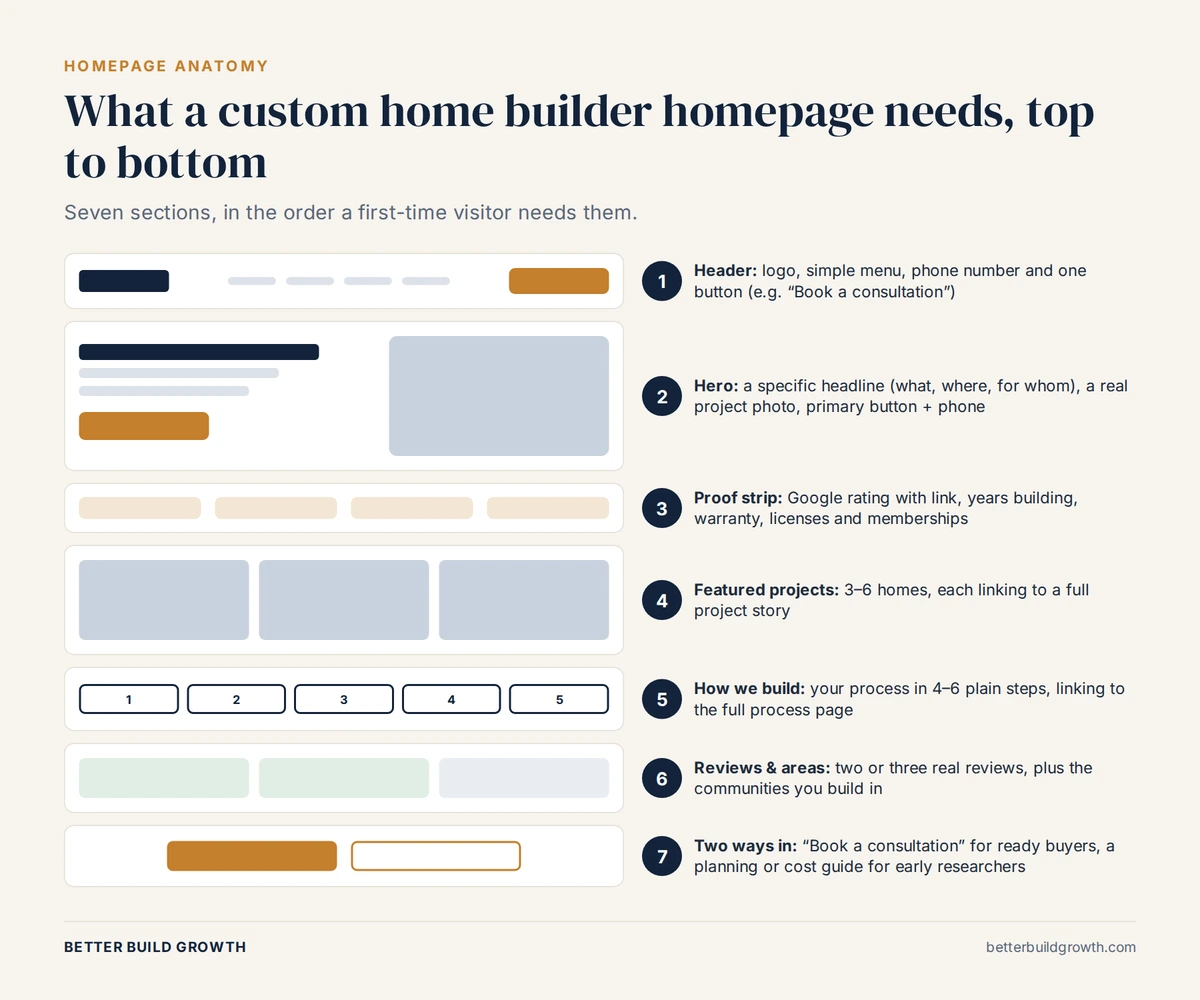
A custom home builder homepage, top to bottom, in the order a first-time visitor needs it.
What good looks like:
- A specific headline. “Custom homes on your lot across [County], from design to move-in” beats “Building Dreams Since 1998.” Name what you build and where.
- A real project photo, not a stock image.
- One primary button such as “Book a consultation,” plus a clickable phone number.
- A proof strip directly below: your Google rating with a link to your profile, years in business, warranty and relevant memberships.
- Three to six featured projects, each linking to its full story.
- Your process in a few steps, linking to the full process page.
- Reviews and areas served, followed by a second chance to act.
Common mistakes: rotating sliders that hide your message, vague taglines, stock photography, and autoplay video that slows the page on mobile.
2. A project portfolio with real case studies
The portfolio is the most visited part of most builder websites, and usually the weakest. A grid of beautiful photos shows that you can build a good-looking house. It does not show what it was like to build it with you.
What good looks like:
- A gallery that buyers can filter by style, location or size.
- A full story for your best projects: the location, the lot and its challenges, the design partner (with their permission), key decisions, the timeline, a budget range if the client agrees, and a quote from the client.
- In-progress photos, not only the finished home. They show how you work.
- Descriptive image file names and alt text. Google’s image SEO best practices recommend descriptive file names and alt text that accurately describes the image, rather than names like IMG_0042.jpg.
Case studies are also where you demonstrate the first “E” in Google’s E-E-A-T: experience. They give search engines and AI assistants specific, real detail to draw on. We cover how to get far more out of each project in how market leaders maximize the life of a single project, and why the story matters more than the photos in why beautiful homes don’t always create great marketing.
3. Your building process
A custom build is a big, unfamiliar and slightly frightening process for most buyers. A clear process page lowers that fear more than almost anything else on your site.
What to include:
- The first conversation and what you will need from the buyer
- Lot evaluation and feasibility
- Design, whether in-house or with the buyer’s architect
- Pricing and the type of contract you use, such as fixed price or cost-plus, and what that means for the buyer
- Permits and approvals in your area
- The main construction phases and how long each typically takes in your market
- How and how often you communicate during the build
- Final walkthrough, handover and warranty
Use your own real timelines. Buyers compare process pages, and specific detail beats generic reassurance every time.
4. A page for each service
If you build custom homes on the buyer’s lot, offer design-build, and build to an outside architect’s plans, those are three different buyers searching for three different things. Give each its own page.
One page per service helps you rank for each type of search, and lets you speak directly to that buyer. Avoid several pages that say almost the same thing, because they end up competing with each other in search.
5. Pages for the areas you build in
Buyers search with a place in mind. A page for each genuine market you serve helps you appear in those searches and shows local knowledge.
What makes an area page useful:
- The communities and neighborhoods you have built in
- Local realities: lot types, terrain, utilities, design review boards or HOA requirements
- Permitting considerations in that jurisdiction
- Projects you have completed there, with photos
- Local design and trade partners you work with (with permission)
What to avoid: copying the same page and swapping the town name. Google’s spam policies describe pages created to rank for specific, similar searches as doorway abuse. Build a page only where you genuinely work and have something real to say.
Your Google Business Profile should match. Google’s guidelines for representing your business explain that service-area businesses should have one profile for their central office with a designated service area, rather than a profile for every town.
6. Cost and investment guidance
This is the page builders are most reluctant to create and buyers most want to find. You do not need a price list. You need to help buyers understand whether they are in the right place.
What to include:
- The typical range of your projects, and what moves a home toward the top or bottom of it
- What drives cost in your area: lot conditions, size, design complexity, finishes, site work
- What is and is not included in your pricing, such as design fees, permits and allowances
- How you price: fixed price, cost-plus or a mix, and what that means for the buyer
- The soft costs buyers often forget
A clear cost page filters out buyers who were never a fit and gives the right ones the confidence to call. It is also exactly the kind of specific, useful answer that search engines and AI assistants look for. We explain why silence on cost costs builders leads in why isn’t my home builder website getting leads?
7. A reviews and testimonials page
Buyers will check your reviews before they call. Make it easy for them.
What to include:
- Your Google reviews, with a link to your Google Business Profile so buyers can confirm they are real
- Video testimonials from past clients, if they are willing
- Testimonials from architects, interior designers and other partners
- Reviews placed next to the relevant project stories, not only on one page
One technical note: some builders add review markup to their own site hoping to get star ratings in Google results. Google’s rules say that when a business controls the reviews about itself, pages using LocalBusiness or Organization structured data are not eligible for review star snippets. Show your reviews for buyers, not for stars.
If you need more reviews to show, read how custom home builders get more Google reviews. Our reputation service runs the whole system for you.
8. An about page with real people
Buyers are not hiring a logo. They are trusting specific people with their home and their money. Show them who those people are.
What to include:
- Names, photos and roles of the owner and key team members
- Years in the trade, licenses, certifications and relevant training
- Professional memberships and genuine awards
- Why the company exists and what kind of projects you take on
- The people the buyer will actually deal with during the build
This is also how you show authority and trust, the “A” and “T” in E-E-A-T. Google’s guidance on creating helpful, reliable, people-first content encourages making it clear who is behind the content. A named team does that; a faceless site does not.
9. A contact page that tells buyers what happens next
What to include:
- A short form with helpful qualifying questions: where you plan to build, whether you own a lot, your timeframe and a budget range picked from a dropdown
- A clear promise, such as “We will call you within one business day”
- A short description of the first conversation
- A clickable phone number and email address
- Your office address if you receive visitors, and the areas you serve
- A thank-you page that confirms the next step, tracked as a key event in Google Analytics
10. Resources for buyers who are still researching
Most visitors are not ready to call today. A resources section or blog gives them a reason to stay, come back and trust you.
Write about what buyers are actually asking: what it costs to build in your area, how long it takes, how to evaluate a lot, design-build versus working with an architect, and what to ask a builder before signing. Link each article to the relevant service or area page. This content is what helps you rank for research searches, and it is exactly what AI Overviews and AI assistants draw on when they answer buyer questions. The Better Build blog does the same job for builders researching their marketing.
Trust signals that belong on every page
Proof should not live on one page. Build these into your site-wide header, footer or page templates:
- Your Google rating with a link to your profile
- Real project photos only, never stock images of houses you did not build
- Warranty details
- License and insurance information where your state requires it
- Genuine professional memberships and awards
- A physical address and phone number that match your Google Business Profile exactly
- Named people behind the business
- A privacy policy, especially if you collect contact details
Buyers who arrive through a referral still check these things. We explain why in digital presence for builders: why clients research you first.
Conversion features that turn visitors into consultations
A builder website is not a brochure. It is the start of a sales conversation, so every page needs a way forward.
- One primary call to action, repeated consistently, such as “Book a consultation.”
- A second option for early researchers, such as a planning guide or cost guide in exchange for an email address.
- Tap-to-call on every mobile page, ideally in a sticky bar at the bottom of the screen.
- A short form that asks only what you need to qualify the lead.
- Online booking for a first call, if your team can honor the slots.
- A clear explanation of what happens next, on the form and the thank-you page.
- Instant confirmation and fast follow-up behind every form. A website can only start the conversation. Our lead generation service makes sure someone finishes it.
Not sure how your website measures up?
Talk to us. We will review your site against this checklist and tell you which gaps are costing you consultations.
Technical foundations buyers never see, but Google does
These are invisible to most buyers, but they decide whether the site is found, how fast it loads and whether you can measure results.
- Mobile-friendly, responsive design. Google uses the mobile version of your site for indexing and ranking (mobile-first indexing), so the mobile site must contain the same content as the desktop site.
- Fast loading. Google’s Core Web Vitals recommend Largest Contentful Paint within 2.5 seconds, Interaction to Next Paint under 200 milliseconds and Cumulative Layout Shift under 0.1. Large gallery images are the most common reason builder sites miss these. Test yours with PageSpeed Insights.
- Secure (HTTPS) across the whole site.
- A clear structure: one main heading per page, a unique title tag and meta description, and simple, readable page addresses.
- Internal links between related pages, such as from a project to its area page and service page.
- LocalBusiness structured data with your name, address, phone number and hours. Google’s local business structured data guide explains the required and recommended properties.
- Search Console and Google Analytics set up properly, with form submissions and calls tracked as key events. See our reporting service.
- Accessibility basics: alt text on images, readable text contrast and forms that work with a keyboard.
- A content management system your team can use, so adding a new project does not require a developer.
Building for AI search as well as Google
Buyers increasingly research through AI Overviews and AI assistants, which summarize information and link to sources. Google says there are no extra requirements to appear in AI Overviews or AI Mode; the same fundamentals apply. It specifically recommends making content easy to find through internal links, keeping important content in text rather than images, providing a good page experience, and keeping your structured data and Business Profile information accurate.
In practice, for a builder website that means:
- Answer questions directly. Put the answer in the first sentence of a section, then explain.
- Be specific. Areas you build in, types of home, price ranges and timelines are the details AI tools quote.
- Keep your facts consistent across your website, Google Business Profile and anywhere else you are listed.
- Add short FAQ sections on key pages, written the way buyers ask.
We go deeper on this in is SEO worth it for home builders?
What to leave off your builder website
Some common features do more harm than good:
- Hero sliders that rotate your message away before anyone reads it
- Stock photos of homes you did not build
- Autoplay video or music, especially on mobile
- Pop-ups that cover the page on a phone
- “Coming soon” pages and empty sections
- Generic values such as “Quality. Integrity. Craftsmanship.” that every builder claims
- Out-of-date projects and team members
- Near-identical town pages created only to rank
The custom home builder website checklist
Use this to score your own site. Every unchecked item is a reason a buyer might leave without calling.
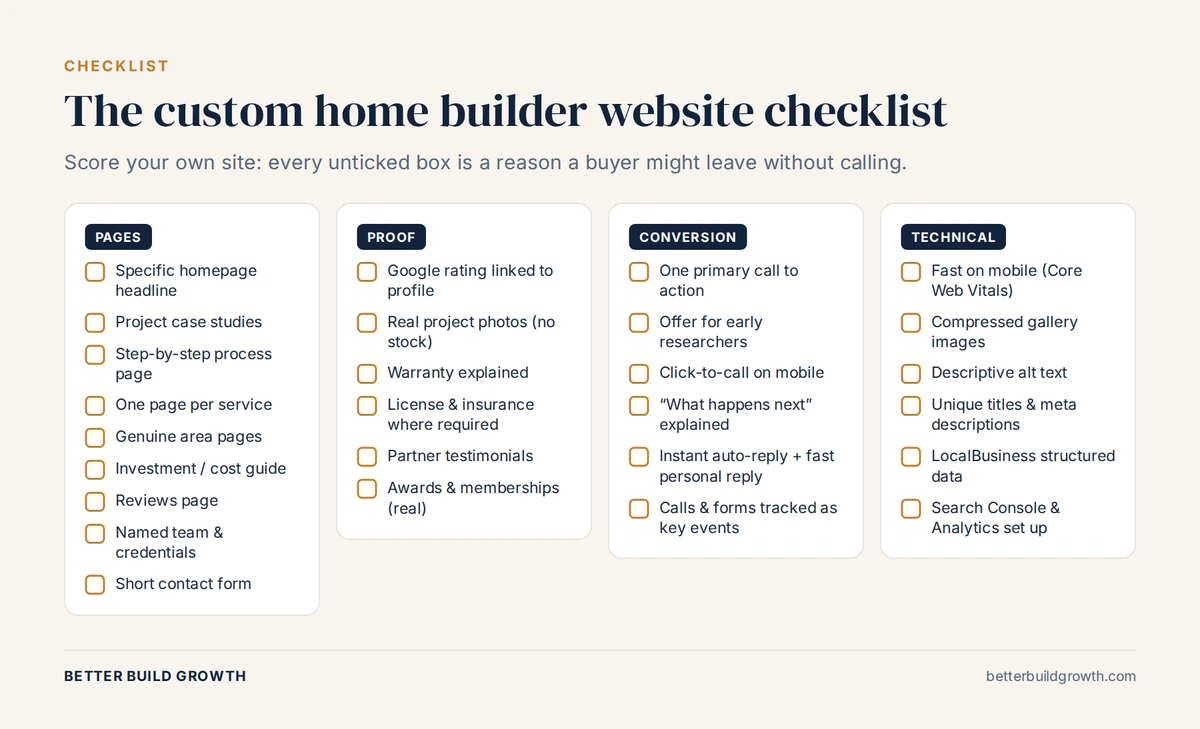
Score your own site. Start with the gaps in the first two columns.
| Area | Must have | What good looks like |
|---|---|---|
| Homepage | Specific headline, real project photo, one clear call to action | A stranger can say what you build, where and for whom within five seconds |
| Projects | Case studies, not just galleries | Lot, challenge, decisions, timeline and client quote for each featured home |
| Process | Step-by-step page | Real timelines for your market and how you communicate |
| Services | One page per distinct service | No two pages competing for the same search |
| Areas | One page per genuine market | Local detail, local projects, no copied pages |
| Cost | A range and what drives it | Buyers know whether they are a fit before they call |
| Reviews | Google reviews linked to your profile | Reviews beside relevant projects and near calls to action |
| About | Named team with credentials | Buyers know who they will deal with |
| Contact | Short form and a response promise | Clear next step, tracked as a key event |
| Technical | Fast, mobile-friendly, structured data, analytics | Passes Core Web Vitals and every lead is measurable |
The bottom line
A custom home builder website should do what your best salesperson does: answer the buyer’s questions honestly, show proof that you deliver, and make the next step easy. That takes eight core pages, proof on every page, a clear call to action, and technical foundations that let Google and AI search understand your business.
Most builders do not need more pages. They need the right pages, with specific detail that a generic site cannot fake. Start with the gaps that buyers notice first: cost guidance, project stories, reviews and a named team.
If you want a second pair of eyes, tell us where your marketing stands. We work only with custom home builders, and we will tell you which gaps are costing you consultations. If you are planning a rebuild, see how we approach websites for custom home builders.
Read next: How do custom home builders get more Google reviews?
Get a Website That Books Consultations
We work only with custom home builders. Book a call and we will review your site against this checklist and show you what to fix first.
Frequently Asked Questions
Q1. What pages should a custom home builder website have?
At minimum: a homepage, a project portfolio with case studies, a building process page, a page for each service, a page for each genuine area you build in, a cost or investment guide, a reviews page, an about page with your named team, and a contact page. A resources section or blog helps you reach buyers who are still researching.
Q2. How much does a custom home builder website cost?
As a one-off project, builder websites typically range from around $8,000 to $40,000 or more, depending on design, the number of project and area pages, and conversion features. Because every other channel sends traffic to your website, underinvesting here reduces the return on everything else.
Q3. Should a custom home builder show prices on their website?
You do not need exact prices, but you should give a realistic range and explain what drives cost. This helps the right buyers feel confident enough to call and filters out those who were never a fit. Cost is one of the first things buyers want to understand, so a site that answers it gives them a reason to stay.
Q4. How many project photos should a builder website show?
Quality and context matter more than quantity. Show your best projects, organize them so buyers can filter by style or location, and give your top projects a full story with in-progress photos, the challenge and the result. Compress images so galleries do not slow the site down on mobile.
Q5. Does a home builder website need a blog?
It is not essential on day one, but it is one of the best ways to reach buyers who are months away from choosing a builder. Articles that answer real questions, such as cost to build in your area or how to evaluate a lot, help you rank in search and give AI tools useful content to draw on.
Q6. How do I make my builder website show up in AI search?
Follow the same fundamentals as traditional SEO. Google says there are no special requirements for its AI features. Make sure pages can be crawled, answer questions directly in text, be specific about what you build and where, keep your business details consistent everywhere, and keep your Google Business Profile accurate.
Q7. How often should I update my home builder website?
Add new projects as you complete them, refresh your reviews regularly, and review your cost guidance and team page at least once a year. A site that shows recent work and current people looks active and trustworthy. A site with the same projects for five years suggests the opposite.