
BUILDER INSIGHTS
How Do Custom Home Builders Get More Google Reviews?
You only hand over a handful of homes a year, so every review counts. Here is when to ask, what to say, and the rules that can cost you your reviews if you ignore them.
ESTIMATED READ TIME: 13 MINUTES
Want to skip the reading? Speak directly with our Director of Growth Strategy.
Custom home builders get more Google reviews by asking every client at the right moments in the build, making it take a couple of minutes, and following up once. In practice, that means a personal ask from the owner or project manager at handover, a message with your Google review link within a day or two, a gentle reminder a few weeks later, and a second opportunity at the warranty walkthrough. It also means staying inside Google’s rules: no incentives, no asking only the happy clients, and no reviews from staff or family.
The challenge for builders is volume. A restaurant serves hundreds of customers a week. A custom builder might hand over the keys to a few homes a year. You cannot afford to waste a single review opportunity, and you cannot afford a mistake that gets reviews removed.
This guide covers why reviews matter so much for builders, the best moments to ask, word-for-word scripts, how to reply to good and bad reviews, what Google and the Federal Trade Commission prohibit, and how to turn the whole thing into a system that runs without you remembering to do it.
Why Google reviews matter so much for custom home builders
They affect whether you appear in local search. Google’s own guidance on improving your local ranking says that more reviews and positive ratings can help a business’s local ranking. Google ranks local results on relevance, distance and prominence, and reviews are part of how prominent a business looks.
They answer the buyer’s biggest fear. Someone about to spend seven figures on a home is not worried about whether you can build a nice house. They are worried about budget, timeline, communication and what happens when something goes wrong. Reviews from past clients are the closest thing a buyer has to an honest answer.
Referrals check them too. A buyer who hears your name from a friend will still look you up before they call. If your profile has a handful of old reviews, the referral loses some of its power. We explain this in why clients research you first.
They feed AI search. AI Overviews and AI assistants summarize what is published about a business. Google’s guidance on AI features and your website recommends keeping your Business Profile information accurate. A profile with a steady stream of detailed, genuine reviews gives those systems more to work with than one with a few one-line ratings.
Replies are part of your reputation. Google notes that positive reviews and helpful replies can help a business stand out. Every reply you write is read by the next buyer, not just the reviewer.
Why builders struggle to get reviews
If reviews are so valuable, why do most builders have so few? In our experience, it comes down to six things:
- Low volume. A few clients a year means a few chances a year. Miss one and it is gone.
- Asking at the wrong moment. Asking during the punch list, when small frustrations are fresh, or waiting so long that the moment passes.
- Nobody owns it. The owner assumes the project manager will ask. The project manager assumes the office will. Nobody does.
- Friction. Clients do not know where to go, and some do not realize they need a Google account.
- Fear of asking. Some builders worry that asking will prompt a negative review. In practice, a client who is unhappy is likely to say so whether or not you ask. A client who is happy often says nothing unless you ask.
- Privacy concerns. Many high-end clients are private people. Some will not want their full name on a public review. That is fine: reviews are posted under the name on the reviewer’s Google account, and a review does not need to mention an address or any personal detail to be helpful.
When to ask: the best review moments in a custom build
Timing is the biggest lever you have. Ask when the experience is fresh and positive, not when the client is in the middle of a list of small fixes.
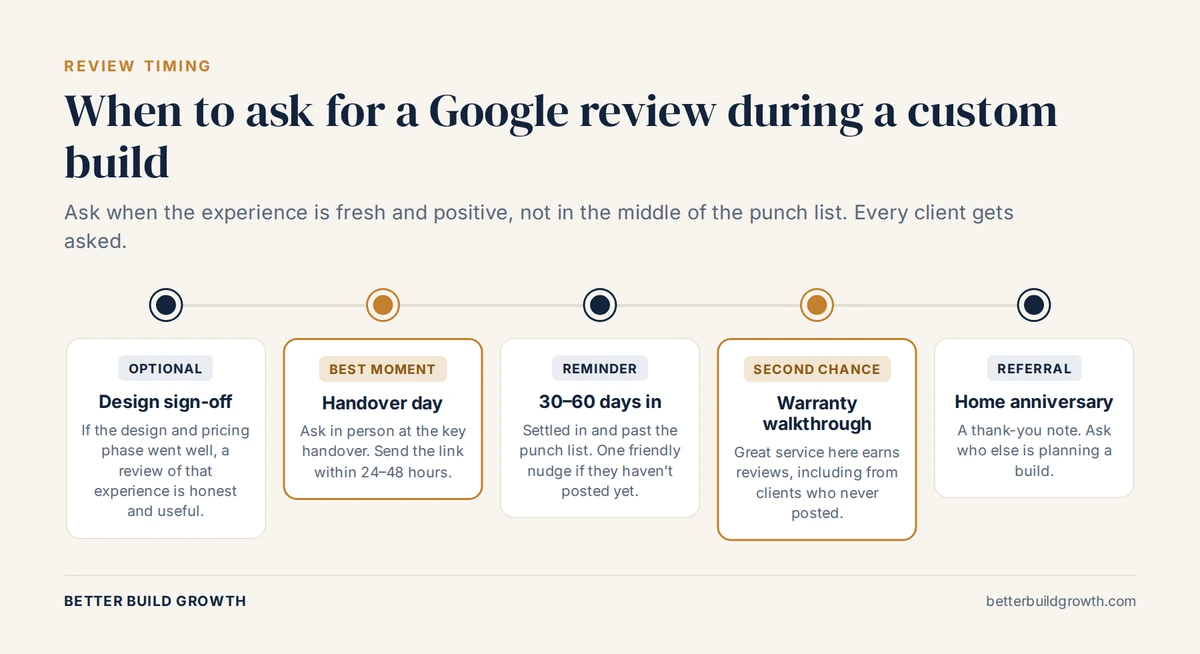
Five moments to ask. Handover and the warranty walkthrough usually produce the most reviews.
1. Design sign-off (optional). On a long build, the design and pricing phase is a real experience in its own right. If it went well, it is fair and honest to ask the client to review that part of working with you. Many will update their review later.
2. Handover day (the best moment). This is the emotional high point of the whole project. Ask in person, then send your review link within 24 to 48 hours while the feeling is fresh.
3. 30 to 60 days after move-in. The client has settled in and the punch list is behind them. If they have not posted yet, one friendly reminder is fine.
4. The warranty walkthrough. Great service at this stage earns reviews, including from clients who did not post at handover. It is also a strong signal to future buyers that you stand behind your work.
5. The home anniversary. A thank-you note on the anniversary of move-in is a good time to ask for referrals rather than reviews. Our guide to how custom home builders get leads covers how prompted referrals work.
What about architects, designers and trade partners? Their endorsements carry real weight with buyers, but be careful where you publish them. Google’s policies treat content based on a conflict of interest, including a contractual, consulting or other professional relationship, as a problem. The safest approach is to feature partner endorsements as testimonials on your website and in your proposals, rather than as Google reviews of your business.
How to ask: make it personal, specific and easy
Step 1: Get your Google review link or QR code
Google lets you create a direct link and a QR code that open the review form for your business. According to Google’s help page on how to create a link or QR code to request reviews, you go to your Business Profile, select Read reviews, then Get more reviews, and copy the link or save the QR code. Google notes that review QR codes can currently only be generated in a computer browser, not on mobile.
Put the link in your email signature, your handover pack and your CRM templates. Print the QR code on a card for the handover folder.
Step 2: Ask in person at handover
A personal ask from the owner or project manager works far better than an automated email on its own. Keep it short and genuine.
In person, at handover:
“It has been a real privilege building this home with you. Most of our new clients find us by reading what past clients say about us, so an honest review on Google would mean a lot. I’ll send you the link tomorrow so it only takes a couple of minutes.”
Step 3: Send the link within 24 to 48 hours
Text message:
“Hi [Name], it’s [Your name] from [Company]. Thank you again for trusting us with your home. Here is the link I mentioned. It takes a couple of minutes, and an honest review helps other families decide whether we are the right builder for them: [review link]”
Subject: Thank you, and one small favor
Hi [Name],
Handing over your keys this week was a highlight for our whole team. Thank you for trusting us with your home.
If you have a couple of minutes, we would be grateful for an honest review on Google. Families considering a custom home read these closely, and your experience will help them decide whether we are the right fit.
[Leave a review]
If anything is not right in the house, please call me directly at [phone]. I would much rather hear it from you first.
Thank you,
[Your name]
Step 4: Send one reminder, then stop
If there is no review after a week or two, send one friendly reminder. After that, let it go until the next natural moment, such as the warranty walkthrough. Repeated chasing damages the relationship you just spent a year building.
Step 5: Let clients write in their own words
Do not draft the review for them, do not tell them what to say, and do not ask them to name a particular team member. Google’s policies specifically call out businesses asking staff to solicit reviews that include specific content, including content that identifies a staff member. You can say that honest detail about the experience is most helpful to future buyers. Leave the rest to them.
It also helps to let clients post from their own phone or computer, in their own time, rather than asking them to do it on a device in your office.
Ask every client, not just the happy ones
It is tempting to ask only the clients you know are delighted. Don’t.
Google’s content policies prohibit businesses from discouraging or prohibiting negative reviews, or selectively soliciting positive reviews from customers. That rules out “review gating”: sending happy clients to Google and unhappy ones to a private feedback form.
There is a practical reason too. A profile made up entirely of glowing five-star reviews can look less believable to a careful buyer, not more. A thoughtful, professional reply to a fair critical review often does more for your reputation than another five-star rating. And if a client is unhappy, you want to know, so you can fix it.
The rules: what Google and the FTC prohibit
Getting reviews wrong can cost you more than getting none. Reviews that break Google’s policies can be removed, and in the US, the Federal Trade Commission now has a specific rule on fake reviews and testimonials.
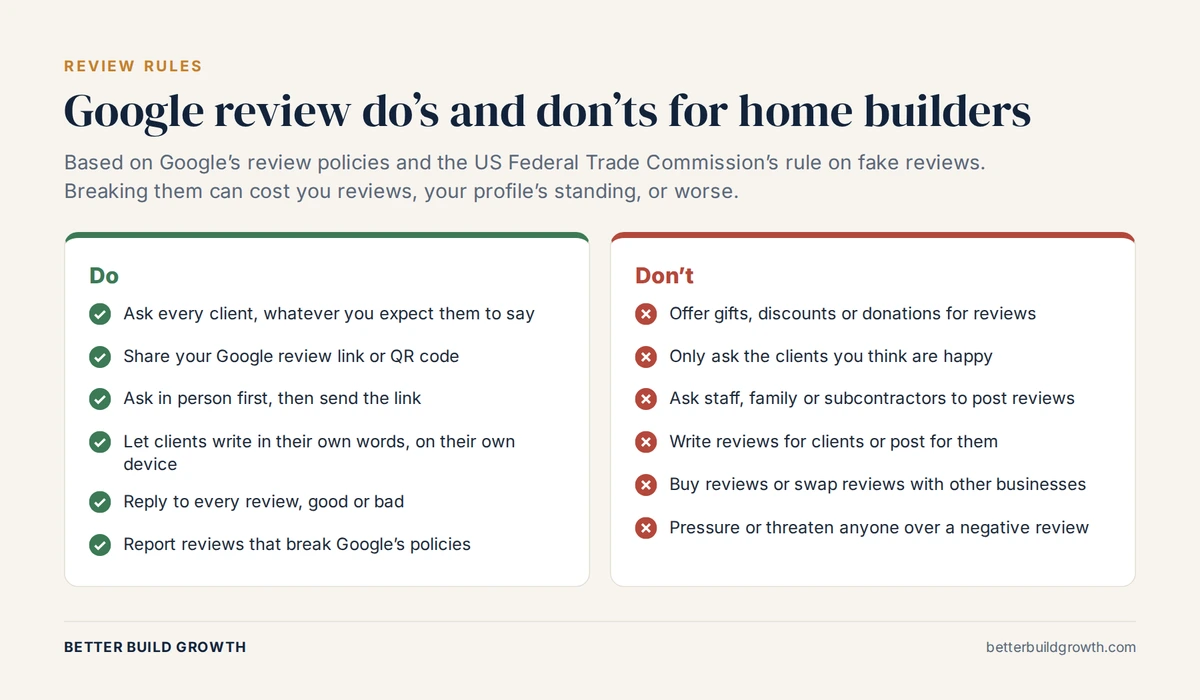
The review do’s and don’ts every builder and office team should know.
| Don’t | Why |
|---|---|
| Offer gifts, discounts, donations or any other reward for a review | Google says incentives in exchange for reviews are fake and misleading content and strictly prohibited |
| Only ask clients you expect to be happy | Google prohibits selectively soliciting positive reviews |
| Ask employees, family, friends or subcontractors to review you | Google treats conflicts of interest as prohibited content, and the FTC rule targets undisclosed insider reviews |
| Write reviews for clients or post them on their behalf | Reviews must reflect the reviewer’s genuine experience |
| Buy reviews, or swap reviews with other businesses | Paid and conflict-of-interest reviews break Google’s policies; the FTC rule bans buying fake reviews |
| Threaten, pressure or intimidate anyone over a negative review | The FTC rule bans using threats or intimidation to suppress negative reviews |
| Set review quotas for staff | Google’s policies call out businesses requiring staff to solicit a set number of reviews |
The FTC’s final rule banning fake reviews and testimonials prohibits fake reviews, buying reviews that are conditioned on a particular sentiment, undisclosed insider reviews, and review suppression through threats or intimidation. It allows the FTC to seek civil penalties against knowing violators.
We are a marketing agency, not a law firm. If you are unsure whether a specific practice is allowed, check with your attorney before you do it.
How to reply to Google reviews, good and bad
Google explains in its guide to managing customer reviews that approved replies are posted publicly under the review and appear as coming from your business. That means every reply is read by future buyers. Write for them.
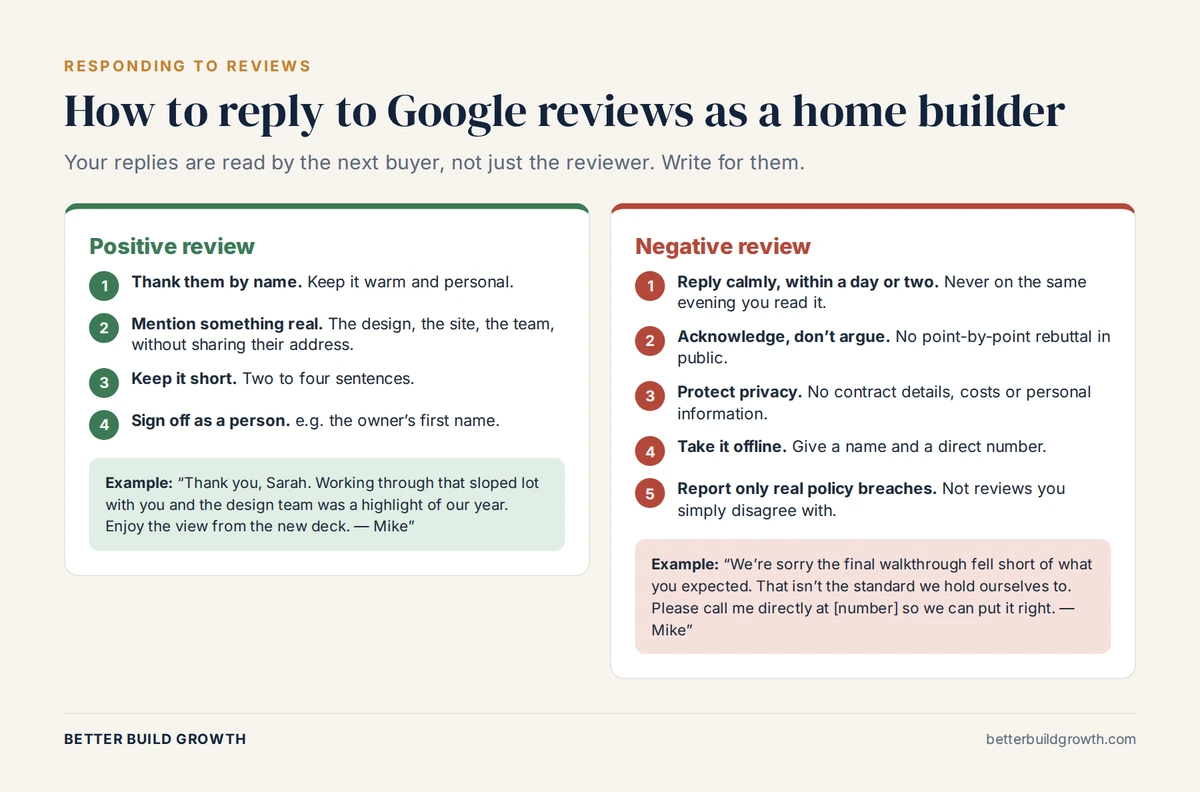
Your replies are read by the next buyer, not just the reviewer.
Replying to a positive review:
- Thank the client by name
- Mention something specific and real about the project, without revealing their address
- Keep it to two to four sentences
- Sign off as a person, such as the owner
“Thank you, Sarah. Working through that sloped lot with you and the design team was a highlight of our year. Enjoy the view from the new deck. Mike”
Replying to a negative review:
- Reply calmly, within a day or two, and never on the evening you first read it
- Acknowledge the experience without arguing the details in public
- Never share contract terms, costs or personal information
- Give a name and a direct number, and move the conversation offline
- Fix the problem if you can. A client who feels heard may update their review, but never offer anything in exchange for changing or removing it
“We’re sorry the final walkthrough fell short of what you expected. That isn’t the standard we hold ourselves to. Please call me directly at [number] so we can put it right. Mike”
When you can get a review removed. You cannot delete reviews yourself. If a review breaks Google’s policies, for example it is fake, from someone who was never a client, or contains offensive content, you can report it for removal. Google is clear that you should not report a review just because you disagree with it.
Put your reviews to work beyond Google
Reviews earned on Google should work across your whole marketing:
- On your website. Show reviews on a dedicated reviews page, next to relevant project stories and near your calls to action, with a link to your Google profile. We explain where they belong in what a custom home builder website should include. Note that Google does not show review stars in search results for reviews a business displays about itself; see its review snippet guidelines.
- In proposals and sales meetings. A short selection of relevant reviews builds trust at the moment a buyer is deciding.
- As the start of a case study. Your best reviews often point to your best project stories. See how market leaders maximize the life of a single project.
- In your operations. Recurring themes in reviews, good or bad, tell you what to protect and what to fix.
If your website is not turning that proof into inquiries, read why isn’t my home builder website getting leads?
Want a review system that runs without you chasing it?
Talk to us. We will set up the requests, timing, tracking and replies so every completed home becomes proof for the next one.
Build a review system that runs without you
Builders who get reviews consistently do not rely on remembering. They build it into the project process.
| Trigger | Action | Owner | Channel |
|---|---|---|---|
| Design sign-off (optional) | Ask for a review of the design and planning experience | Owner or designer | In person, then email |
| Handover complete | Personal ask, then send the review link within 24 to 48 hours | Owner or project manager | In person, then text or email |
| One to two weeks later, no review | One friendly reminder | Office | |
| Warranty walkthrough | Ask clients who have not reviewed yet | Warranty or project manager | In person, then text |
| Any new review | Reply within a day or two | Owner or marketing lead | Google Business Profile |
| Home anniversary | Thank-you note and referral ask | Owner | Card or email |
Three things make this work:
- One owner. A named person is responsible for reviews, even if others do the asking.
- Automated triggers. When a project reaches “handover” in your CRM, the review message goes out automatically. Our lead generation service sets up exactly this kind of automation.
- Simple tracking. Each month, look at new reviews, your average rating, how quickly you replied and how you compare with other builders in your local map results. Our reporting service puts this alongside your lead data.
If you would rather hand the whole thing over, our reputation service for home builders runs review requests, monitoring, replies and showcasing for you. You can also see what our own clients say on our reviews page.
The bottom line
Custom home builders get more Google reviews by treating them as part of the build, not an afterthought. Ask every client in person at handover, send a direct link within a day or two, remind once, and ask again at the warranty walkthrough. Reply to every review like the next buyer is reading, because they are.
Just as important is what not to do. No incentives, no asking only the happy clients, no reviews from staff, family or partners, and no pressure over negative reviews. A slower, honest review profile is worth far more than a fast one that Google can remove.
For a business that completes a handful of homes a year, every review is precious. If you want a system that captures each one, tell us where your marketing stands. We work only with custom home builders.
Read next: Is SEO worth it for home builders?
Turn Happy Clients Into Your Best Sales Tool
We work only with custom home builders. Book a call and we will set up a review system that earns proof from every completed home.
Frequently Asked Questions
Q1. How many Google reviews does a custom home builder need?
There is no magic number. What matters is how your profile compares with the other builders buyers see in your local map results, and whether your reviews are recent and detailed. For a builder completing a handful of homes a year, aim for a review from every completed project and a steady flow over time, rather than a burst followed by silence.
Q2. Is it OK to ask clients for a Google review?
Yes. Google actively encourages businesses to ask customers for reviews and provides a review link and QR code for that purpose. What is not allowed is offering incentives, asking only the clients you expect to be positive, or pressuring anyone about what to write.
Q3. Can I offer a gift card or discount in exchange for a review?
No. Google says that offering incentives, like free or discounted goods or services, in exchange for reviews is considered fake engagement and is strictly prohibited. A thank-you gift at handover is fine as long as it is not tied to leaving a review.
Q4. Can architects, designers or subcontractors leave my business a Google review?
Be cautious. Google’s policies treat content based on a conflict of interest, including contractual or professional relationships, as prohibited. Partner endorsements are valuable, but they are safer on your website, in proposals and on professional networks, clearly presented as partner testimonials.
Q5. How do I get a bad Google review removed?
You cannot remove a review yourself. If it breaks Google’s policies, for example it is fake, from someone who was never a client, or contains offensive content, report it through your Business Profile or Google’s Reviews Management Tool. If the review is genuine, reply professionally and try to resolve the issue. A good reply often reassures future buyers more than the review worries them.
Q6. Should I respond to every Google review?
Yes. Reply to positive reviews with a short, personal thank-you, and to negative reviews calmly and professionally, moving the conversation offline. Google notes that helpful replies show you value customer feedback, and future buyers read your replies as closely as the reviews.
Q7. How do I create a Google review link for my business?
Go to your Google Business Profile, select Read reviews, then Get more reviews. From there you can copy a direct link or save a QR code. Google notes that review QR codes can currently only be generated in a computer browser, not on a mobile device.
Q8. Why did a Google review for my business disappear?
Google removes reviews it identifies as breaking its policies, which can include reviews it suspects are not based on a genuine experience or involve a conflict of interest. Asking everyone, letting clients post on their own devices in their own words, and never offering incentives all reduce the risk of genuine reviews being caught up in that process.