
LOCATION PAGES
Should Custom Home Builders Create Location Pages for Every Town They Serve?
A page for every town can help or hurt your SEO. Here is when a location page is worth building, when it is not, and what a strong one must include.
ESTIMATED READ TIME: 11 MINUTES
Want to skip the reading? Speak directly with our Director of Growth Strategy.
At some point, almost every builder who invests in SEO hears the same advice: “Create a page for every town you serve.” It sounds simple. Twenty towns, twenty pages, twenty new chances to rank.
So the pages get built. Each one has the same layout, the same three paragraphs, the same photos, and a different town name swapped into the headline. A few months later, most of them aren’t ranking. Some never even show up in Google. And a few builders find their whole site performing worse than before.
Location pages can absolutely help a custom home builder rank in the towns that matter most. But built the wrong way, they’re one of the fastest ways to fill your site with thin, repetitive content that Google treats as low value.
This guide answers the question directly: should you create a location page for every town you serve? It explains what Google says about these pages, how to decide which towns deserve one, and exactly what a strong builder location page should include.
The short answer: No. Custom home builders should create dedicated location pages only for towns where they have real substance to share, such as completed projects, local building knowledge, and genuine demand they want to win. Google warns against near-identical city pages built just to rank. For other towns, use a regional page, your Google Business Profile service areas, and project pages instead.
What Is a Location Page?
A location page (sometimes called a service area page or city page) is a page on your website about your services in a specific place. For a builder, it might be titled “Custom Home Builder in Evergreen, Colorado” and live at a URL like /custom-home-builder-evergreen/.
It’s different from two related things:
- Your Google Business Profile service areas, which tell Google where you work for the map results. Google lets you list up to 20 service areas.
- Project pages, which describe a specific home you built, often in a specific town.
Location pages mainly help with organic search results, the regular listings below the map. They can help you appear for searches like “custom home builder [town]” in towns some distance from your office, where your Business Profile may not show in the map results.
What Google Says About City and Location Pages
Google doesn’t ban location pages. Many businesses use them well. But Google is very clear about the kind it doesn’t want.
Google’s spam policies describe doorway abuse as creating sites or pages to rank for specific, similar search queries. One of the examples Google gives is having multiple pages targeted at specific regions or cities that funnel users to one page. Another is producing near-identical pages that are closer to search results than a clearly defined, browseable hierarchy.
The same policies also warn against:
- Keyword stuffing, including blocks of text listing cities and regions a page is trying to rank for
- Scaled content abuse, which means producing many pages mainly to manipulate rankings rather than help users, regardless of whether they’re made by people or AI tools
Google’s guidance on creating helpful, people-first content points the same way. It warns against producing lots of content on many topics in the hope that some of it performs well, and it asks whether your content provides original information or simply rewords other sources.
In short, a location page is safe and useful when it’s genuinely about that place and genuinely helpful to someone building there. It becomes a problem when it exists only to catch a search with a different town name.
Why Copy-Paste Town Pages Usually Fail
Even setting the spam risk aside, templated town pages tend to fail for simple reasons:
- Google has little reason to rank them. If twenty pages say the same thing, none of them is the best answer for any town.
- They don’t convince buyers. A family building in a mountain town wants to know you understand steep lots, access roads, and local design review. Generic copy tells them you don’t.
- They can weaken your site overall. A site filled with low-value pages sends a weak signal about the quality of the whole site.
- They can compete with each other and with your main pages, splitting attention between near-duplicates.
One strong page for a town where you’ve built homes almost always outperforms a dozen thin ones.
How to Decide Which Towns Deserve Their Own Page
Instead of asking “Which towns do we serve?”, ask “Which towns can we write something genuinely useful about?” Two simple questions sort most towns.
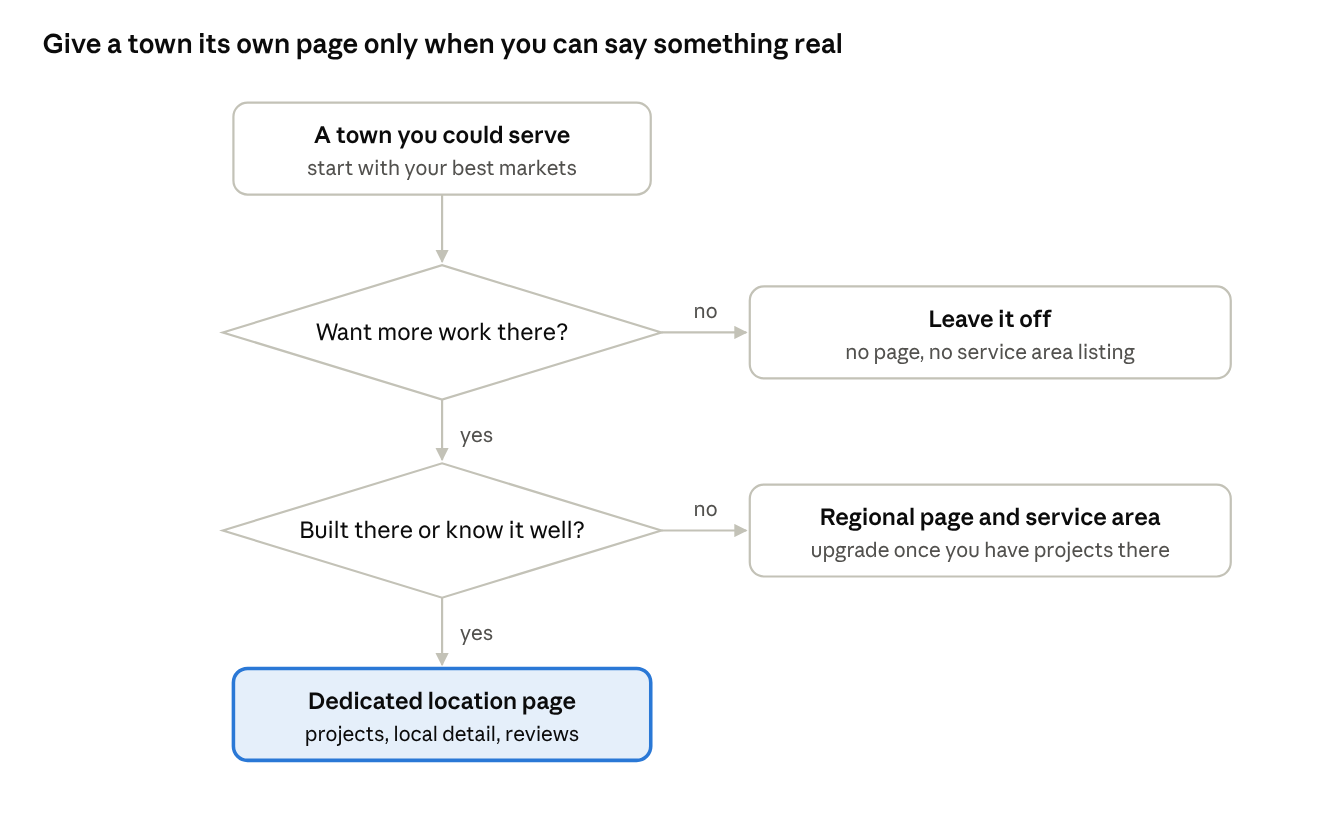
A town usually earns a dedicated page when most of these are true:
- You’ve completed homes there, or have one underway, that you can show and describe.
- You actively want more work there. It fits your ideal project type, lot type, and budget range.
- You have local knowledge to share, such as typical lot conditions, local design review, HOA rules, access, or climate considerations.
- Buyers search for it by name. Check Search Console and Keyword Planner, but don’t rule out small towns just because volume estimates are low. Our guide to SEO keywords for custom home builders explains why.
- You can write at least several paragraphs that wouldn’t make sense on any other town’s page.
If a town fails these tests, it doesn’t need its own page yet. That doesn’t mean you can’t win work there. It means a different approach will serve you better for now.
A Better Structure: Three Tiers of Local Content
Most custom builders get the best results from a tiered approach rather than one page per town.
| Tier | What it is | Best for |
|---|---|---|
| Tier 1: Dedicated location pages | A full page for a single town or community | Your most important markets, where you’ve built homes and want more work |
| Tier 2: Regional pages | One page covering a county, valley, or group of nearby towns, with a short, genuinely different note on each | Areas you serve but where you don’t yet have enough material for separate pages |
| Tier 3: Supporting content | Project pages, blog posts, and your Business Profile service areas | Every town where you build, mentioned naturally where it’s relevant |
This structure gives Google a clear, browsable hierarchy and gives buyers useful information at every level. As you complete more homes in a Tier 2 town, you can promote it to its own Tier 1 page.
What a Strong Builder Location Page Includes
A good location page reads like it was written by a builder who knows the area, because it was. Here’s what to include.
1. A clear, specific introduction
State what you build in that town and for whom. For example: “We design and build custom homes on hillside and forested lots across Evergreen, from Upper Bear Creek to Hiwan.” Avoid generic openings that could apply anywhere.
2. Homes you’ve built there
This is the heart of the page. Feature completed or in-progress projects in that town with photos, a short description of each, and links to the full project pages. Nothing proves local experience better.
3. Local building knowledge
Share what makes building in that town different. Depending on the area, that might include:
- Typical lot conditions, such as slopes, rock, trees, or water access
- Local design review boards, HOA rules, or architectural guidelines
- Climate and site considerations, such as snow, wind, heat, or wildfire risk
- Utility and access issues, such as wells, septic systems, or private roads
- Neighborhoods or communities where you often build
Only include points you know to be accurate. If you mention local rules, keep them general or link to the relevant local authority rather than guessing at details.
4. Reviews from local clients
A testimonial from a family who built in that town is far more persuasive than a general one. Where clients are comfortable with it, name the town.
5. Local partners
Mention the architects, designers, and specialist trades you work with in that area, with their permission. It shows real local relationships and helps buyers who already have a designer in mind.
6. Answers to local questions
Add a short FAQ with questions buyers ask about building in that specific town, such as typical timelines, lot evaluation, or how design review works.
7. A clear next step
End with a simple call to action, such as scheduling a lot of consultation or a call to discuss their project.
Technical basics
- Use a clean URL, such as /custom-home-builder-evergreen/ or /areas-we-serve/evergreen/.
- Write a unique page title and meta description for each page.
- Link to the page from your main service area or “Where We Build” page and from related project pages.
- Don’t add a fake address. Your business address should match your real, staffed office.
Have a stack of thin town pages?
Talk to us. We will review your location pages and show you which to strengthen, merge or remove.
Location Page Do’s and Don’ts
| Do | Don’t |
|---|---|
| Write each page from scratch about that town | Swap the town name into a template |
| Feature projects you built there | Use the same photos on every page |
| Share real local building knowledge | Pad the page with generic text to hit a word count |
| Link to it from a clear “Where We Build” hub | Hide it in the footer with a long list of town links |
| Mention nearby towns naturally where relevant | Add blocks of city names to the page |
| Start with your most important markets | Create pages for towns you rarely or never serve |
| Improve or merge weak pages | Leave dozens of thin pages live forever |
How Location Pages Work With Your Google Business Profile
Location pages and your Business Profile do different jobs, and they work best together.
- Your Business Profile drives the map results. Its service areas tell Google where you work, but your office location still influences how you rank in the map results.
- Location pages support the organic results. They can help you appear for “custom home builder [town]” searches, including in towns further from your office.
A buyer who finds your location page will often check your Business Profile and reviews next, and the other way round. Keep your business details consistent across both. For a full walkthrough, see our Google Business Profile guide for home builders and our broader guide to local SEO for custom home builders.
Already Have Thin Town Pages? Here’s How to Fix Them
If your site already has a set of templated town pages, don’t panic. Audit them one by one:
- Check performance in Google Search Console. Use the Performance report to see which pages get impressions and clicks.
- Keep and improve pages for your key markets. Rewrite them with real projects, local detail, and reviews.
- Merge pages for nearby small towns into a single regional page. Redirect the old URLs to the new page so visitors and links aren’t lost.
- Remove pages for towns you don’t actually serve.
- Update your internal links so menus and hub pages point to the pages you kept.
Fewer, stronger pages almost always serve both buyers and rankings better.
How to Measure Location Page Success
Judge each page by what it contributes:
- Impressions and clicks for “[town]” searches in Search Console
- Rankings for your main keyword for that town
- Inquiries that came from or passed through the page
- Lead quality: do inquiries from that page fit your ideal project?
If a page has been live for several months with no impressions, it may need more substance, better internal links, or merging into a regional page.
Final Thoughts: Build Pages for People in the Places You Build
The question isn’t really whether you should have location pages. It’s whether each page earns its place. A page about a town where you’ve built homes, written by someone who knows its lots, rules, and neighborhoods, is valuable to buyers and to Google. A page that only swaps in a new town name isn’t.
Start with your two or three most important markets and make those pages excellent. Group smaller towns into regional pages. Mention every place you build in your projects and Business Profile. Then grow your location pages as your portfolio grows.
If you’d like help deciding which towns deserve pages and building them the right way, our SEO service for custom home builders covers local content strategy from start to finish. Talk to our team about the markets you want to win.
Build Pages for People in the Places You Build
We work only with custom home builders. Book a call and we will plan location pages that earn rankings in the towns that matter to you.
Frequently Asked Questions About Location Pages for Home Builders
Q1. Should a home builder create a page for every city they serve?
No. Create dedicated pages only for towns where you have real substance, such as completed homes, local building knowledge, and demand you want to win. Google’s spam policies warn against near-identical pages for different cities made mainly to rank.
Q2. Are location pages considered doorway pages?
Not automatically. Location pages become a problem when they’re near-identical, offer little unique value, and exist mainly to rank for town-name searches. A page with real projects, local information, and reviews is helpful content, not a doorway page.
Q3. How many location pages should a custom builder have?
There’s no right number. Most builders do best with a small set of strong pages for their key markets, a regional page for surrounding areas, and project pages that mention every town where they’ve built.
Q4. Can I rank in a town without a location page?
Yes. Project pages, blog posts about building in that area, reviews that mention the town, and your Business Profile service areas can all help. A dedicated page simply gives you a stronger, more focused option once you have enough to say.
Q5. How long should a location page be?
Google says it doesn’t prefer any particular word count. Write enough to be genuinely helpful: what you build there, homes you’ve completed, local considerations, reviews, and next steps. A useful page often needs several hundred words or more, but substance matters more than length.
Q6. Should I use AI to write location pages?
AI can help with drafting, but publishing many lightly edited, similar pages risks falling under Google’s scaled content abuse policy. Every page should include real projects, local knowledge, and details only your team can provide.
Q7. Should location pages include an address?
Only your real business address, if you show one at all. Never add a fake or virtual address for a town where you don’t have a staffed office. Focus location pages on your work in the area instead.